Feature Approval Workflow
The Feature Approval Workflow in Calibo Accelerate allows product teams to streamline and control the approval process for features within a product. By enabling this workflow, you can ensure that every feature undergoes a defined review and approval cycle before it moves forward in the product life cycle.
Key Benefits
-
Ensuring Accountability: Assign approvers to review and approve features, ensuring that only validated features progress through the development lifecycle.
-
Supporting Customization: Teams can use the default workflow template or customize it to match their specific process requirements.
-
Tracking Progress: Visual workflows make it easy to understand a feature’s current status in the approval process.
By using the Feature Approval Workflow, organizations can reduce errors, improve collaboration, and maintain transparency across product development activities.
Prerequisites
Before you access or submit a feature for approval in Calibo Accelerate, ensure the following prerequisites are met:
 1. You have the required role assignment.
You must be assigned an appropriate system‑defined role or a custom role that provides access to products. see Roles in Calibo Accelerate platform.
2. A feature approval workflow template is created.
The template defines the approval process for feature submissions. See Designing a Global Workflow Template.
3. The Feature Creation event is enabled at the global level.
The event must be enabled and assigned a workflow template so that feature submissions trigger the approval workflow automatically. See Enabling Global Workflows.

Note:
The Feature Creation workflow event ensures that the system automatically initiates the approval workflow whenever a Feature is submitted.
How to Change or Edit the Feature Approval Workflow Template at the Product Level:
Follow these steps to change or edit the feature approval workflow template at the Product level:
-
Sign in to the Calibo Accelerate platform, click Products in the left navigation pane.
-
On the Product screen, choose your desired Product, where you want to change or edit the Feature Approval workflow template.
-
Within the Product screen, click on the ellipsis (…) and then click on View Details or Edit.
-
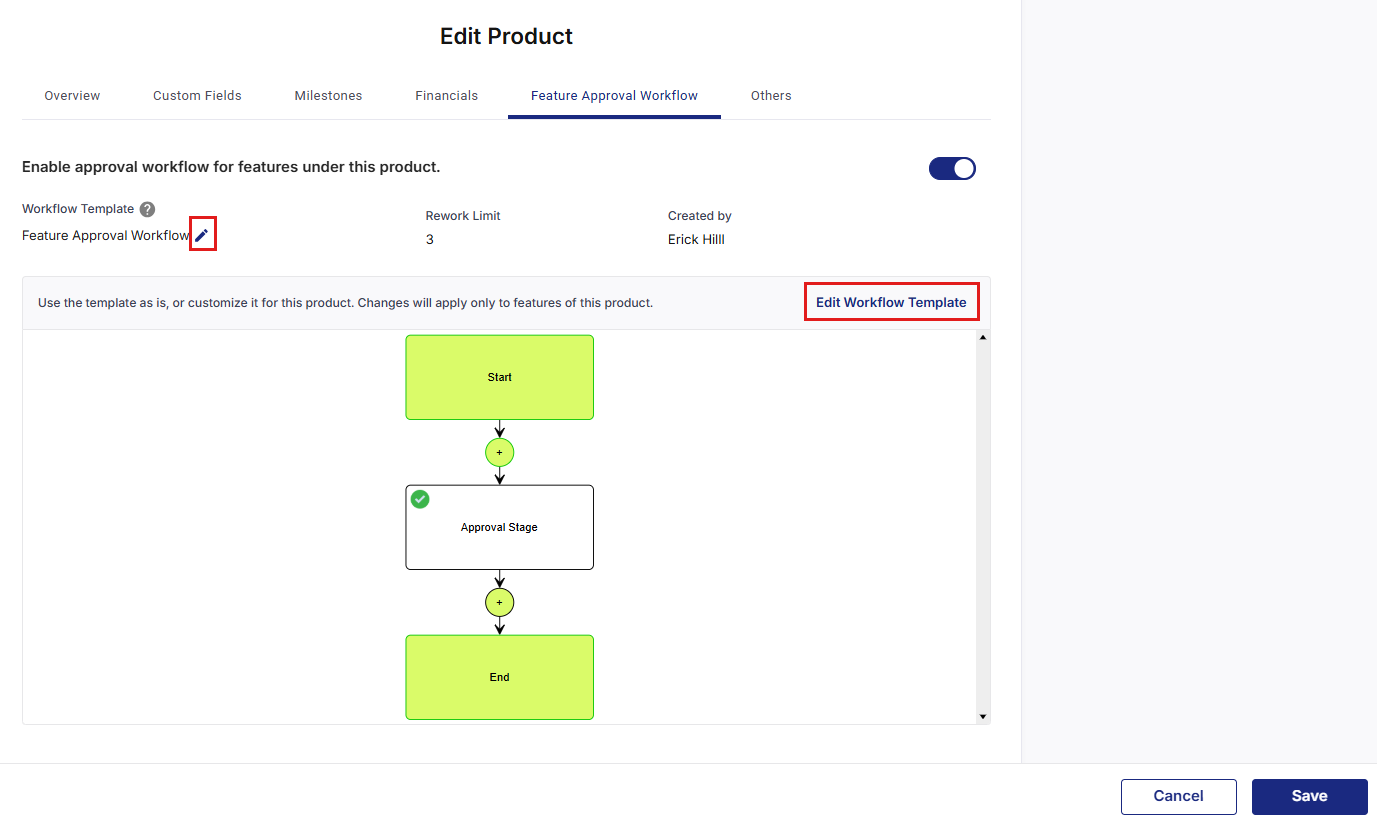
On the Edit Product screen, under the Feature Approval Workflow tab, click on the pencil icon to select another Feature Approval or General workflow template from the dropdown list, or keep the default template assigned at the global level.
Note:
When a Feature Creation event is disabled at the global level, the toggle labeled Enable approval workflow for features under this product will be automatically disabled while creating a Product in the Feature Approval Workflow tab.
-
If you want to modify the selected workflow template, click Edit Workflow Template.
-
In the pop-up, provide a new name and click Proceed and update the workflow as per your business needs.
-
Click Save to apply the changes.
Best Practices
Review Templates Regularly
-
Ensure workflow templates reflect current organizational processes and approval hierarchies.
Document Customizations
-
Maintain documentation of any feature-specific workflow modifications for team reference.
Test Before Deployment
-
Validate workflow changes in a test environment before applying them to production products.
Communicate Changes
-
Notify relevant stakeholders when approval workflows are modified to maintain alignment.
|
What's next? Phases of a Product |