Deploy Serverless Applications to AWS Lambda Using AWS SAM
Calibo Accelerate enables you to deploy and manage serverless applications on AWS Lambda using the AWS Serverless Application Model (SAM). This integration allows you to configure, build, deploy, test, and monitor Lambda functions directly from the Calibo Accelerate interface—without switching to the AWS Console.
Using AWS SAM, Calibo Accelerate abstracts the complexity of CloudFormation-based Lambda deployments while still giving you fine-grained control over deployment parameters, IAM roles, artifacts, and runtime configuration.

Note:
Currently, this support is available with GitHub Actions–based CI/CD pipelines. Support for AWS Lambda deployments using AWS SAM with Jenkins as a CI/CD tool will be added in a subsequent release.
Prerequisites
Before you begin, ensure the following prerequisites are met:
1. AWS Account Configuration
-
An AWS account is configured in Calibo Accelerate with required IAM permissions for:
-
AWS Lambda
-
AWS CloudFormation
-
Amazon S3 (for SAM artifact storage)
-
Amazon ECR (if using image-based Lambda packaging)
1.1 Required IAM Permissions in CloudFormation Template
Ensure that the CloudFormation template used to configure your AWS account includes the necessary IAM permissions for Lambda serverless deployments through Calibo Accelerate.
The IAM role created by the template (CloudFormation Assume Role) includes permissions similar to the following:
Copy{
"Version": "2012-10-17",
"Statement": [
{
"Sid": "CFNReadOnly",
"Effect": "Allow",
"Action": [
"cloudformation:DescribeStacks",
"cloudformation:ListStackResources"
],
"Resource": "*"
},
{
"Sid": "LambdaGetAndInvoke",
"Effect": "Allow",
"Action": [
"lambda:GetFunction",
"lambda:ListAliases",
"lambda:ListVersionsByFunction",
"lambda:InvokeFunction"
],
"Resource": "*"
},
{
"Sid": "ReadCloudWatchLogsForLambda",
"Effect": "Allow",
"Action": [
"logs:DescribeLogGroups",
"logs:DescribeLogStreams",
"logs:GetLogEvents",
"logs:FilterLogEvents"
],
"Resource": "*"
},
{
"Sid": "ReadCloudWatchMetrics",
"Effect": "Allow",
"Action": [
"cloudwatch:GetMetricData",
"cloudwatch:GetMetricStatistics",
"cloudwatch:ListMetrics"
],
"Resource": "*"
},
{
"Sid": "ListS3BucketsAndIAMRoles",
"Effect": "Allow",
"Action": [
"s3:ListAllMyBuckets",
"s3:GetBucketLocation",
"iam:ListRoles"
],
"Resource": "*"
}
]
}This role must trust the CloudFormation service (cloudformation.amazonaws.com) in its trust policy. In addition, the role used by the deployment workflow (for example, the SAM Execution Role assumed by GitHub Actions) must have iam:PassRole permission on the CloudFormation Assume Role to allow CloudFormation to assume it during stack operations.
1.2 OIDC-Based Deployment Role for GitHub Actions (Mandatory)
To use GitHub Actions to execute your SAM deployments, your AWS account must trust GitHub via OIDC federation. Ensure the following:
-
An IAM OIDC Identity Provider is created:
-
Provider URL: https://token.actions.githubusercontent.com
-
Audience: sts.amazonaws.com
-
An IAM role is created for SAM deployment (for example, calibo-sam-deploy-role) that:
-
Can be assumed via sts:AssumeRoleWithWebIdentity
-
Is restricted to your GitHub organization / repository
-
Has permissions for:
-
S3 artifact upload
-
CloudFormation change set creation and execution
-
iam:PassRole (if a separate Lambda execution role is used)
-
-
-
The Role ARN of this deployment role is configured in Calibo Accelerate under the AWS SAM settings in a deployment stage of a feature.
Without this OIDC-based deployment role, GitHub Actions cannot deploy SAM stacks into your AWS account.
-
2. Source Code Repository
A GitHub repository must exist containing:-
Application source code
-
AWS SAM template file (for example, template.yaml)
3. CI/CD Tool Configuration
The connection details of your GitHub Actions account must be configured in Calibo Accelerate.4. Container Image Scanning Tool Configuration
(Optional) The connection details of your Snyk account must be configured if you are using image-based Lambda packaging, and container image vulnerability scanning is required. -
Deploying an AWS Lambda (Serverless) Application Using AWS SAM in Calibo Accelerate
After completing the prerequisites, follow these steps to build, configure, and deploy your AWS Lambda function using AWS SAM through Calibo Accelerate.
 Step 1: Add an AWS Lambda (SAM) Technology in the Develop Phase
To begin implementing and coding a serverless application that you want to deploy to AWS Lambda, you must first add the appropriate AWS Lambda (SAM) technology templates in the Develop phase of your feature. This enables you to set up the technology stack, create the source code repository, and begin implementing Lambda function logic before moving on to deployment configuration. To add the technology templates, do the following:
-
In the Develop phase of your product feature, click + New Technologies. If you haven't created a branch template yet, you'll be prompted to do so before adding a technology. To create a branch template as per your branching strategy, click Configure Branch Template. See Create Branch Template.
If you choose to do it later, click Proceed.
-
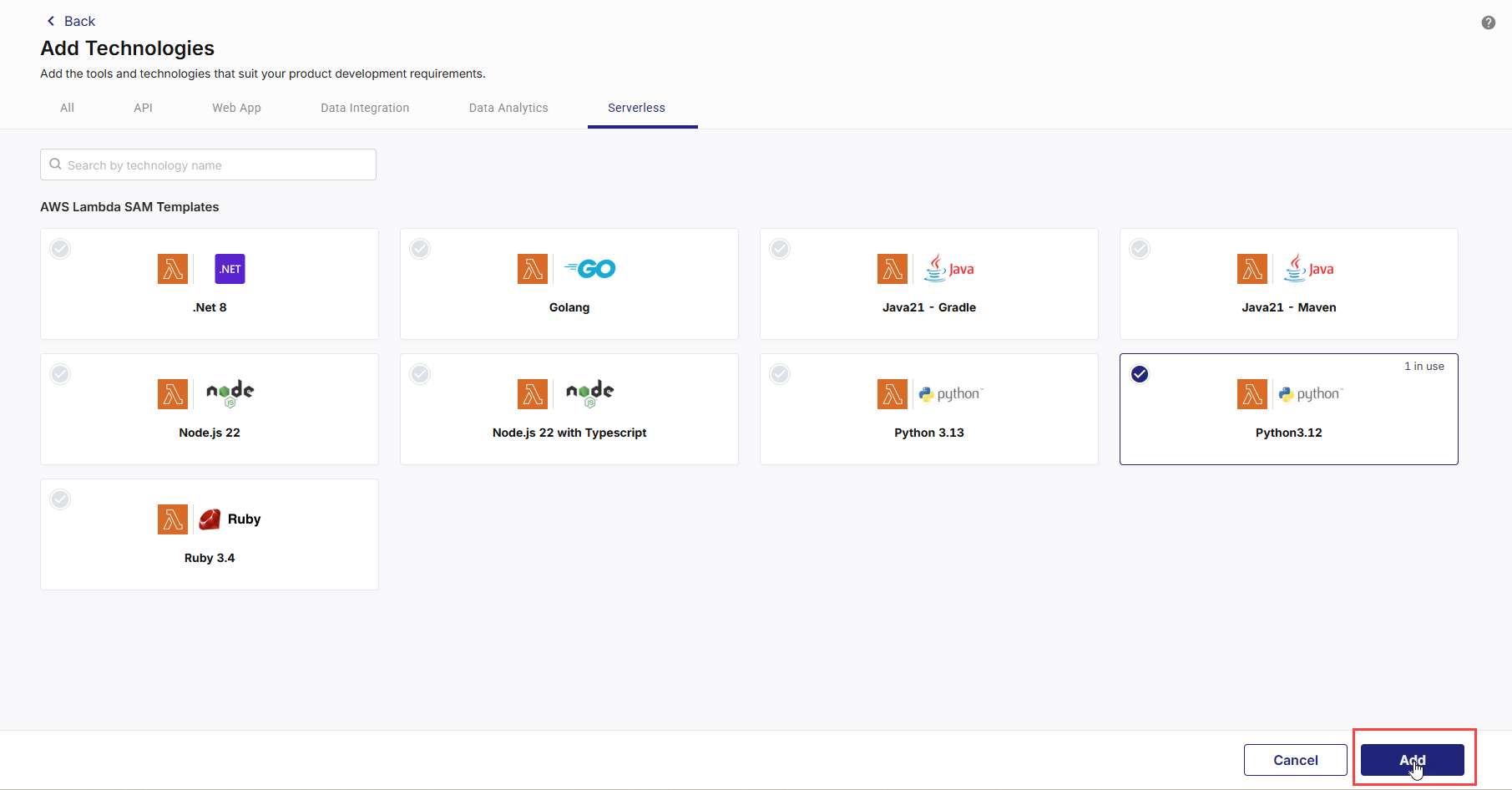
On the Add Technologies screen, on the Serverless tab, in the AWS Lambda SAM Templates section, choose your desired runtime templates. Currently, the following templates are available:
-
.NET 8
-
Golang
-
Java 21 – Gradle
-
Java 21 – Maven
-
Node.js 22
-
Node.js 22 with Typescript
-
Python 3.13
-
Python 3.12
-
Ruby 3.4
These templates help you bootstrap application development quickly. Select the required technology templates and click Add.
-
-
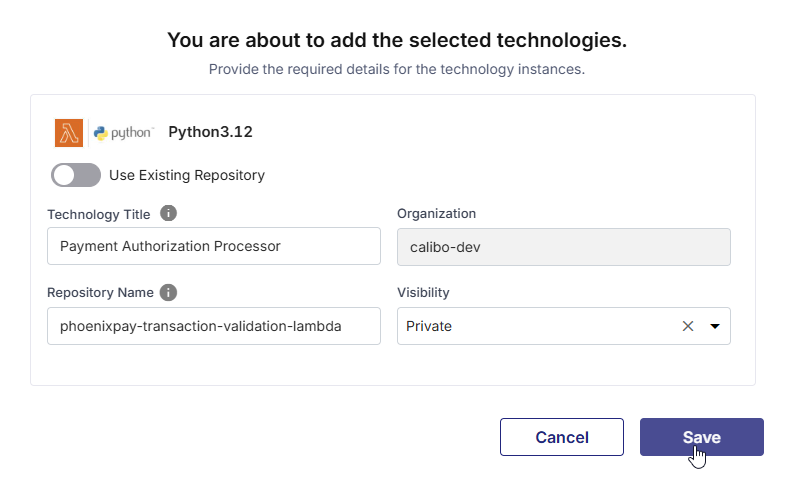
Provide the required details:
-
Title
Enter a logical name for the Lambda technology. -
Repository Name
Specify the name of the source code repository to be created for this technology. -
Organization
This field is auto-selected. The organization shown here is configured by your administrator. You cannot modify this value while adding the technology. -
Visibility
Select the repository visibility based on your organization’s governance policy.
If you want to use an existing repository instead of creating a new one:
-
Turn on the Use Existing Repository toggle.
-
Provide a technology title.
-
Select the required repository from the list of repositories available in your configured source code repository tool.
This allows you to associate an existing codebase with the Lambda technology for further development and deployment.
Note:
- Create a new repository when you are starting development for a new Lambda function or serverless capability and want Calibo Accelerate to initialize a repository using a supported technology template.
- Use an existing repository when you already have a Lambda codebase or SAM-based project in your source control system and want to bring it under Calibo Accelerate for deployment, CI/CD automation, and lifecycle management.
Note:
The Publish as Library option is not applicable to AWS Lambda technologies. Lambda functions represent deployable serverless applications and cannot be published or reused as shared library components within the platform.
-
-
Click Save.
Step 2: Develop the Lambda Function Code
After Calibo Accelerate creates or links the repository for the selected AWS Lambda (SAM) technology template, you can begin implementing your Lambda function in the src/ directory and add tests under tests/ as required.
Review and update the provided SAM template to configure function settings, permissions, and event sources.
The provided templates support both ZIP-based and container image–based deployments. You need to select the Lambda package type while configuring the technology deployment details.
Commit and push your changes to the branch you plan to deploy from. Once the source code is ready, proceed to the Deploy phase.
Step 3: Configure the Deployment Stage for Serverless (AWS Lambda)
To deploy a serverless application to AWS Lambda, you must first enable Serverless deployment mode at the deployment stage level of your feature.
-
From the Calibo Accelerate home page, click Products in the left navigation pane.
-
Select your desired product and open the product feature for which you want to deploy an AWS Lambda function.
-
In the feature workflow, select the Deploy phase.
-
On the Deployment Workflow screen, locate the deployment stage you want to configure (for example, Dev).
-
On the selected stage tile, click the ellipsis (...) and then click Edit Details.
-
In the Edit Stage side drawer, configure the following:
-
Deployment Mode
From the Deployment Mode list, select Serverless. -
Cloud Accounts
Select the AWS cloud accounts where you want to deploy the Lambda functions.These cloud accounts are preconfigured by your administrator as part of the initial Calibo Accelerate platform setup. The list displays only the AWS accounts that have already been onboarded and approved for use within your tenant.
If the AWS account you want to use is not available in the list, contact your Calibo Accelerate administrator to have the required cloud account configured or enabled.
-
Continuous Integration Tool
Select GitHub Actions as the CI/CD tool for this stage. -
Container Image Scanning Tool (Optional)
If your Lambda function uses Image-based packaging, you can select Snyk to enable container image vulnerability scanning during CI. -
Code Analysis Tool (Optional)
Select the code analysis tool (for example SonarQube) to be used in the CI/CD pipeline for this stage. -
Click Save to apply the stage configuration.
Note:
The Enable Continuous Integration toggle is not applicable for the Serverless deployment mode.
-
Step 4: Configure AWS SAM Settings at the Stage Level
After enabling the Serverless mode, configure AWS SAM settings at the deployment stage level.
-
On the Deployment tab within the stage, click the Serverless tab.
-
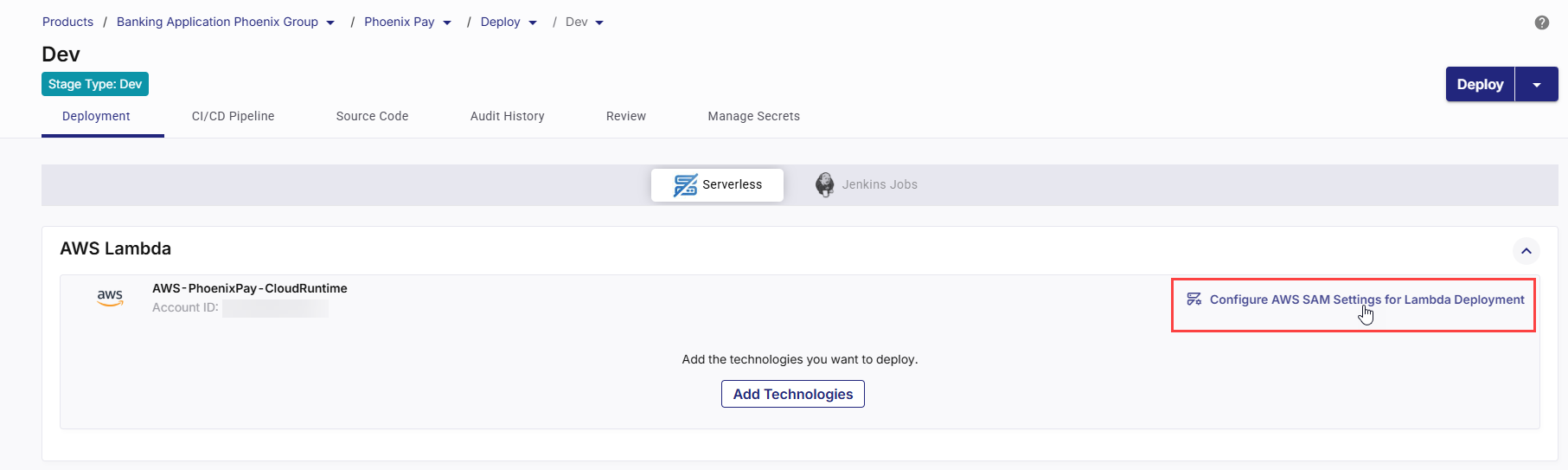
In the AWS Lambda section, all the AWS accounts you selected in the stage configuration are displayed. In your desired AWS account card, in the upper right corner, click Configure AWS SAM Settings for Lambda Deployment.
-
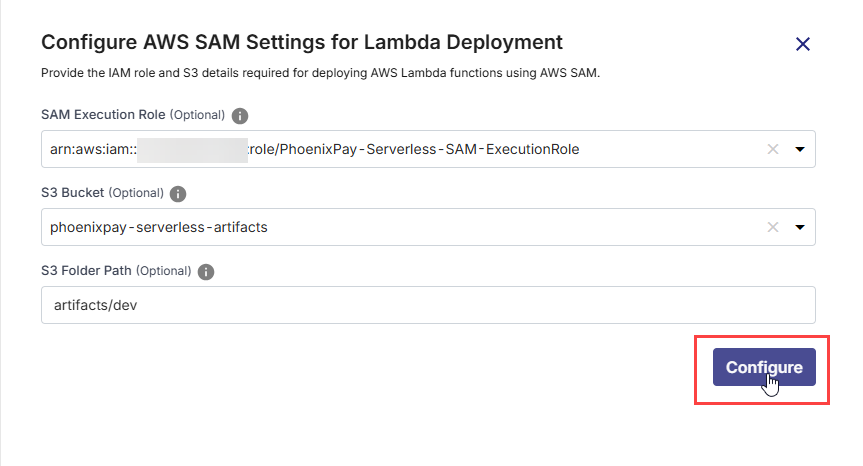
In the Configure AWS SAM Settings for Lambda Deployment side drawer, configure the following:
Field Description SAM Execution Role (Optional) Specify the IAM role assumed by the CI/CD pipeline to build and deploy AWS Lambda functions using AWS SAM. This role must have permissions for CloudFormation and S3 operations required for deployment.
S3 Bucket (Optional) Provide the S3 bucket name where AWS SAM will upload Lambda deployment artifacts or packaged templates before deployment. Ensure the bucket exists in the selected AWS account and region. S3 Folder Path (Optional) Enter the folder path within the specified S3 bucket where build artifacts for this deployment will be stored. If the specified path does not exist, it will be created automatically.
Note:
The settings configured in this section act as default values for all Lambda technologies added to that stage. These values can be overridden at the individual technology level in the deployment details configuration. This allows different Lambda technologies within the same stage to use distinct IAM roles or artifact storage locations, based on security or operational requirements.
Click Configure to save the settings. A confirmation message indicates successful configuration.
Step 5: Add AWS Lambda Technology for Deployment
-
In a deployment stage, on the Serverless tab, in the AWS Lambda section, click Add Technologies.
-
Add the Lambda technologies from the list.
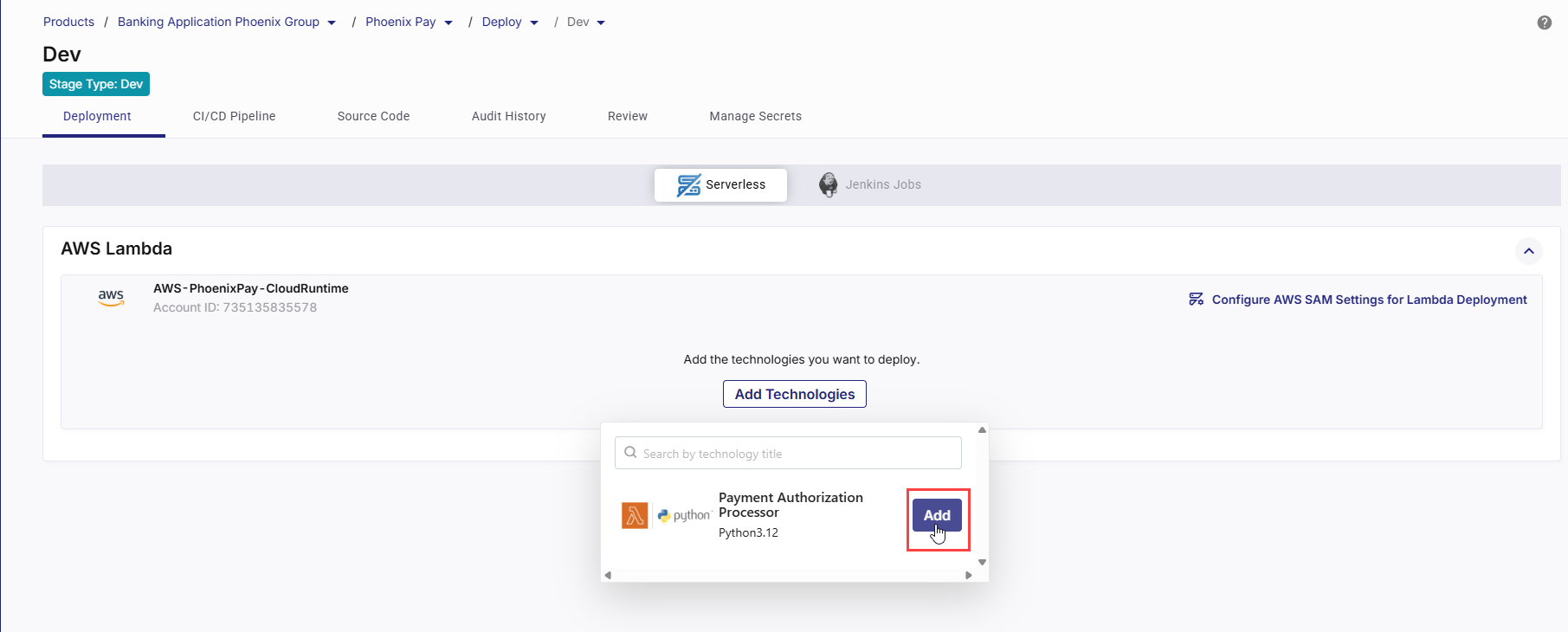
This opens the side drawer to configure deployment details and parameters for the selected Lambda technology. Configure the following details:
1. Basic Deployment Details
Field Description Source Code Branch Select the Git branch that contains the Lambda source code and AWS SAM templates to be used for deployment. The selected branch is used by both CI and CD workflows. AWS Region Select the AWS region where you want to deploy the Lambda function and associated resources (CloudFormation stack, S3 artifacts, ECR images if applicable). Runner Labels Specify the GitHub Actions runner labels to be used for executing CI and CD workflows. By default, ubuntu-latest is selected. Use custom labels if your organization uses self-hosted runners.
-
What are runners in GitHub Actions?
In GitHub Actions, a runner is a server that executes the jobs defined in your workflow. Each runner listens for available jobs, runs them when triggered, and reports the results back to GitHub. There are two main types of runners:GitHub-hosted runners – Managed by GitHub, automatically updated, and preconfigured with popular tools and languages.
Self-hosted runners – Managed by you, allowing custom hardware, software, and network configurations.
-
What are runner labels?
Runner labels are tags or identifiers assigned to self-hosted runners to categorize them based on their characteristics, capabilities, or intended use. When you specify runner labels in your deployment configuration, the job will be assigned only to runners that match all the specified labels.
-
Specify all intended runner labels
Specify one or more runner labels to ensure that the GitHub Actions workflow is assigned to an appropriate runner.
The workflow job is assigned to a runner whose label set matches all specified labels. If no matching runner is available, the job remains in a pending state until one becomes available.
Tip:
Maintain a documented list of available runner labels in your project so developers know which labels to use.
2. Deployment Roles & Access
Field Description SAM Execution Role Select the IAM role assumed by the GitHub Actions workflow to run sam buildandsam deploycommands. This role must have permissions to deploy Lambda functions, manage CloudFormation stacks, and access required AWS services. This role orchestrates the deployment and invokes CloudFormation to create or update the stack.CloudFormation Stack Name Specify the name of the CloudFormation stack that will be created or updated during deployment. Each deployment stage should typically use a unique stack name. Calibo Accelerate verifies the availability of the specified name in the selected AWS account.
A stack name must start with a letter and contain only letters, numbers, and hyphens.
CloudFormation Assume Role (Optional) Specify an IAM role that CloudFormation should assume while executing stack operations. Use this when separating deployment orchestration permissions from infrastructure provisioning permissions.
The CloudFormation Assume Role must trust the CloudFormation service (cloudformation.amazonaws.com) in its trust policy. In addition, the role used by the deployment workflow (for example, the SAM Execution Role assumed by GitHub Actions) must have iam:PassRole permission on the CloudFormation Assume Role to allow CloudFormation to assume it during stack operations.
3. Lambda Configuration Details
These fields define how your Lambda function is packaged and where build artifacts are stored.
Field Description Lambda Package Type Select the packaging type for the Lambda function: Zip or Image. The available options depend on how your SAM template is structured. SAM CloudFormation Template Path Path to the AWS SAM template file in the selected branch (for example, template.yaml or template-image.yaml). This template is used to extract parameters and drive the deployment. ECR Repository This field is available if your Lambda Package Type is Image. In the ECR Repository field, select the Amazon ECR repository that contains the Lambda container image to be deployed.
Ensure that the selected repository contains a valid Lambda-compatible container image and that the configured IAM role has the required permissions to pull images from the repository.
S3 Bucket Select the S3 bucket used to store Lambda build artifacts during ZIP-based deployments. The bucket must already exist and be accessible by the selected execution role. S3 Folder Path (Optional) Specify the folder path within the selected S3 bucket where artifacts are uploaded (for example, artifacts/dev). This helps organize artifacts by environment or stage. Snyk Configuration The section is visible only when Snyk is selected as the Container Image Scanning Tool in the stage configuration.
By specifying the appropriate Snyk project and severity level, you can enforce security gates that cause the CI pipeline to fail when vulnerabilities exceed the allowed risk threshold, preventing insecure container images from being promoted further in the delivery workflow.
Use the following settings to create a Snyk project from within Calibo Accelerate and define the vulnerability severity thresholds that act as security gates for the CI pipeline.
Project:
Provide a unique name for the Snyk project that will be created for this technology. Calibo Accelerate creates a separate Snyk project with this name to independently manage and track scan results for this technology in your Snyk dashboard.
If the project name already exists, or if the configured Snyk API token is invalid or expired, project creation fails and an appropriate validation or authentication error is displayed. In this case, contact your Calibo Accelerate administrator for assistance.
Severity:
Select the vulnerability severity level from the drop-down that will trigger CI pipeline failure:
-
Critical: The pipeline fails only when critical vulnerabilities are detected.
-
High: The pipeline fails when high and/or critical vulnerabilities are detected.
-
Medium: The pipeline fails when medium, high, and/or critical vulnerabilities are detected.
-
Low: The pipeline fails when any vulnerabilities, including low-severity issues, are detected.
-
None: Bypasses severity checks and allows the pipeline to continue regardless of detected vulnerabilities. Use this option when you want to collect information regarding vulnerabilities without blocking the deployment process.
Note:
-
S3 Bucket and Folder Path are required only for ZIP-based Lambda deployments.
-
For Image-based deployments, artifacts are built as container images and pushed to Amazon ECR.
4. Pipeline Triggers
Pipeline triggers control when GitHub Actions workflows are executed for Continuous Integration (CI) and Continuous Deployment (CD).
CI Trigger
The CI trigger determines when the CI workflow runs to build, test, and package the Lambda application.
-
Manual (Default and Mandatory)
-
Always added automatically.
-
Required by Calibo Accelerate to allow you to manually trigger the workflow from the platform if automated triggers are unavailable or fail.
-
Ensures that you can always deploy on demand, even if no code changes occur.
-
-
Additional Triggers
Click + New Trigger to add triggers such as:-
After Push
-
Triggers the workflow automatically whenever a commit is pushed to the selected branch.
-
Ideal for continuous delivery pipelines in lower environments.
-
-
Cron Schedule – You can define one or more time-based schedules to run the workflow automatically at specific times. Useful for nightly builds, weekly refreshes, or maintenance deployments.
In each schedule, you can specify the following:
-
Time Zone: Select the desired time zone for the CI trigger schedule.
-
Frequency : Select the Every Day or Every Week option as required.
-
Time: Define when to trigger the pipeline (in hours and minutes). You can define multiple schedules as well.
-
-
CD Trigger
The CD trigger determines when the deployment workflow runs to deploy the Lambda function using AWS SAM. Depending on your chosen trigger type, deployments can run automatically after CI, on a fixed schedule, or on demand.
-
Manual (Default)
Allows you to explicitly control when deployments are executed. -
Additional Triggers
Click + New Trigger to add triggers such as:-
After CI – Runs deployment automatically after a successful CI run.
-
Cron Schedule
Runs deployment automatically at predefined intervals (for example, daily or weekly). Builds may occur more frequently, but deployments happen only on the set schedule.In each schedule, you can specify the following:
-
Time Zone: Select the desired time zone for the CD trigger schedule.
-
Frequency : Select the Every Day or Every Week option as required.
-
Time: Define when to trigger the pipeline (in hours and minutes). You can define multiple schedules as well.
-
-
You can remove the configured triggers by using the Delete (trash) icon.
-
-
Click Next to proceed. In the Parameters Configuration section, you can add or update parameters required for your Lambda function.
Configure Lambda Parameters (AWS SAM)
Calibo Accelerate reads the latest version of the SAM template from the selected branch and displays all parameters defined under the Parameters: section in the template.yaml file. The Parameter Name column corresponds directly to the parameter names defined in template.yaml.
-
For each parameter displayed, enter the value you want to use for this deployment. These values are applied as runtime overrides when the Lambda function is deployed.
For example:
-
FunctionName → payment-authorization-processor-dev
-
LambdaExecutionRoleArn → ARN of an existing IAM execution role
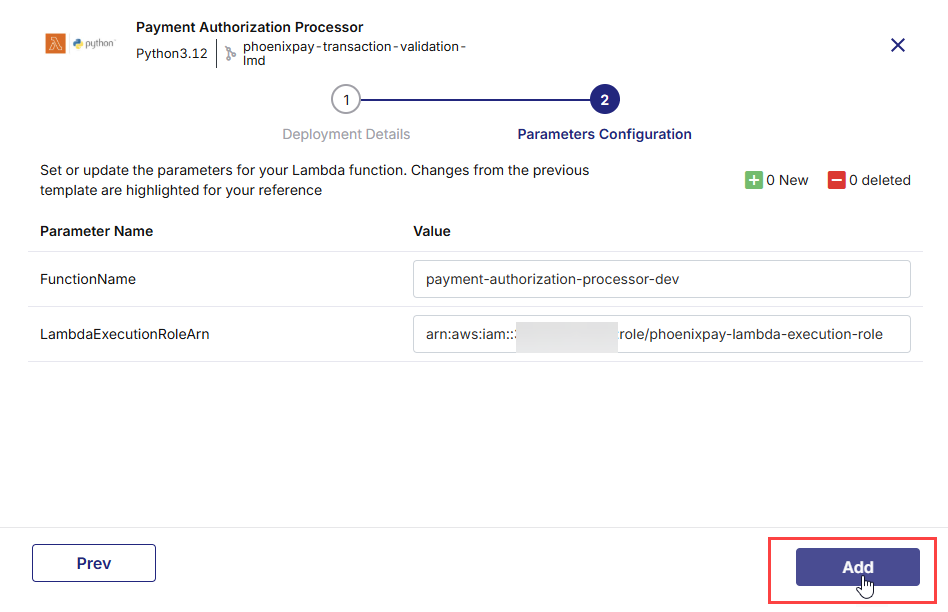
In the upper right corner on the Parameters Configuration screen, the following change indicators are displayed:
-
New – Parameters newly added to the SAM template since the last configuration
-
Deleted – Parameters removed from the SAM template
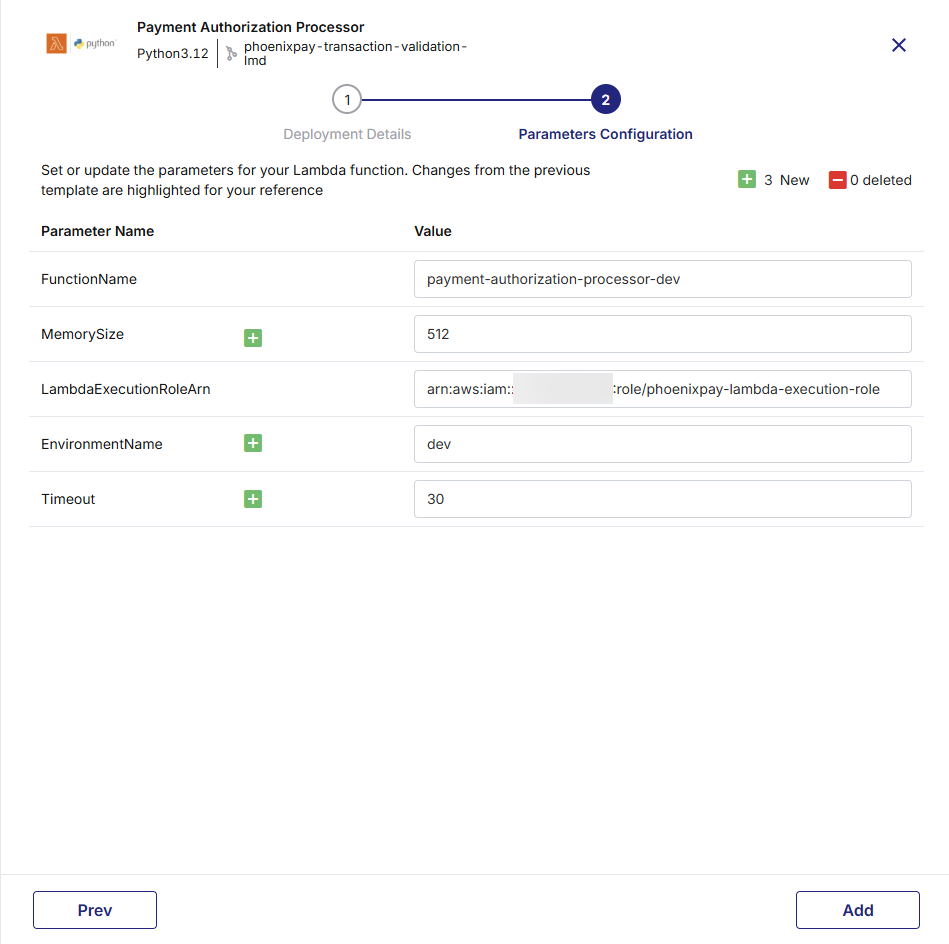
These indicators help you track changes made directly in the template.yaml file stored in the GitHub repository:
-
If you add a parameter in template.yaml, it appears as New in the UI.
-
If you remove a parameter from template.yaml, it appears as Deleted in the UI.
-
If there are no changes, the indicators show 0 New and 0 Deleted.
Note:
When adding or updating CloudFormation parameters in the template.yaml file, ensure proper YAML indentation and alignment. Incorrect formatting may prevent the parameters from synchronizing correctly with the Calibo UI.
-
-
Leave parameters blank if the SAM template defines a default value or if the parameter is optional.
If you keep one or more parameters blank and proceed, a confirmation message is displayed.
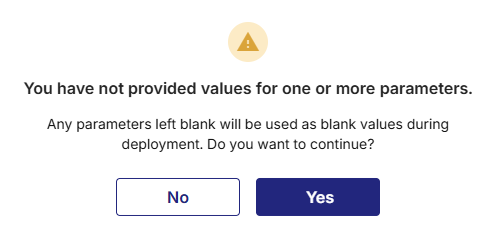
This message indicates that any parameters left blank will be passed to the deployment as blank values. You can choose to continue with blank values or go back and provide the required inputs before proceeding.
-
After you specify the parameter values, click Add to proceed.
The technology is added for deployment to your selected cloud account.
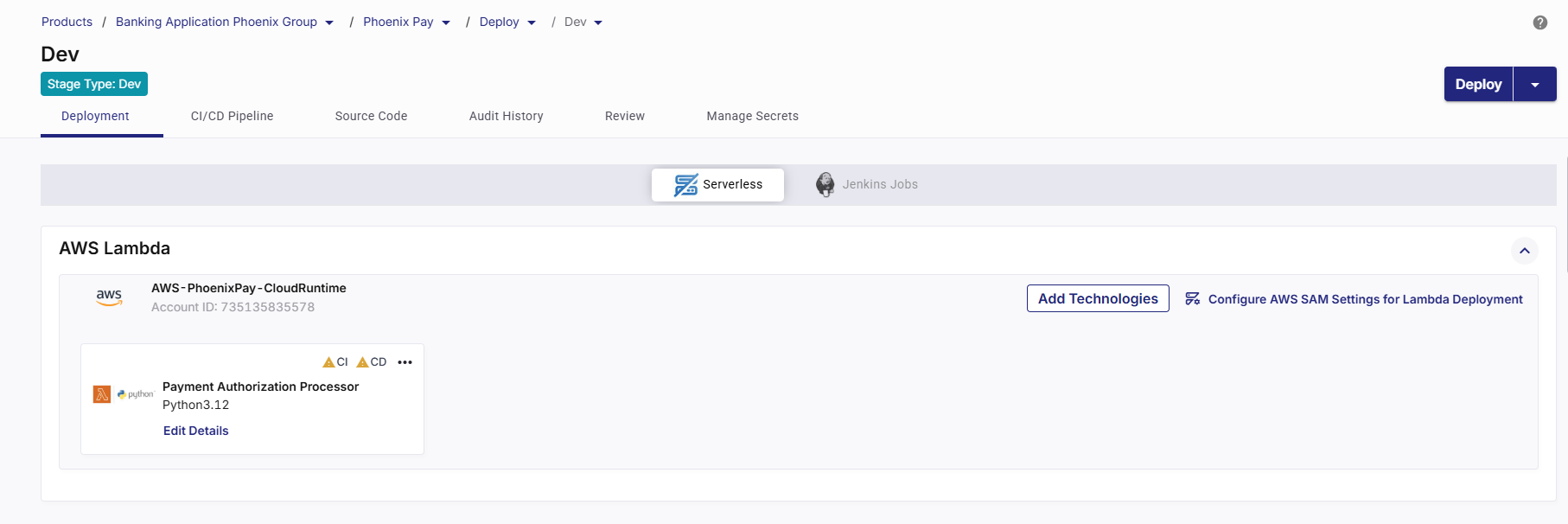
-
Step 6: Deploy Lambda Technology (Using GitHub Actions as CI/CD Tool)
1. Missing YAML Workflow Files Are Identified
As soon as you add a Lambda technology for deployment, Calibo Accelerate automatically detects the required GitHub Actions workflow files needed to enable the CI/CD pipeline. The platform displays a prompt asking you to review and commit these files to the linked GitHub repository. Click Create Pipeline to generate and commit the workflow files to the selected branch, ensuring that the CI/CD pipeline for the technology is properly set up and ready for execution.
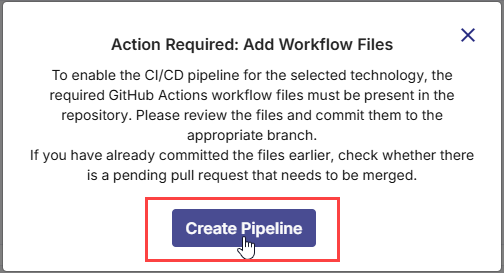
2. Review Pipeline Files
On the Create CI/CD Pipeline screen, the following required pipeline files are listed:
-
Continuous Integration (
ci-dev.yaml) – Handles building the application, running unit tests, performing static code analysis (SonarQube), scanning container images, and preparing artifacts. -
Continuous Deployment (
deploy-serverless-dev.yaml) – Handles serverless application deployments, supporting deploy, promote, rollback, and destroy actions, along with optional functional testing and artifact promotion.
Click each file’s expand icon  to preview its full YAML content.
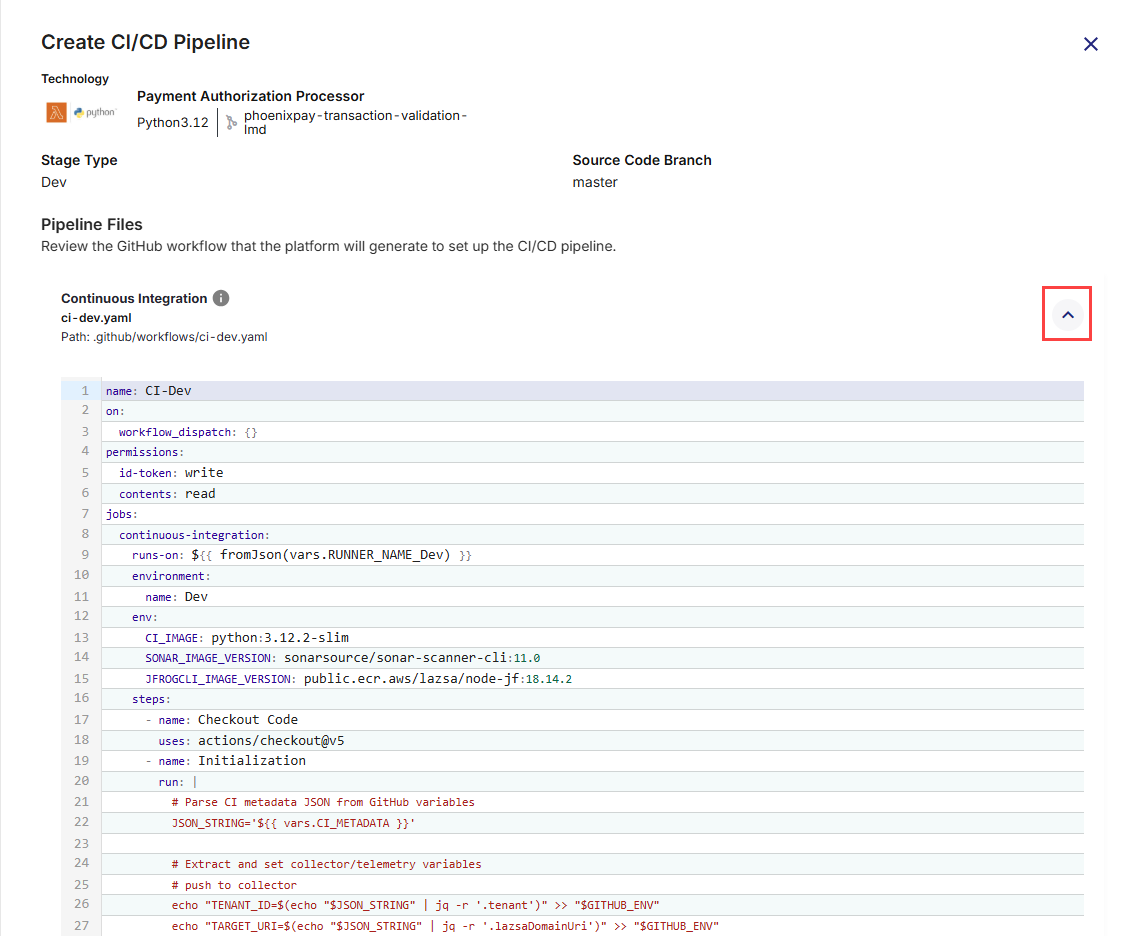
3. Commit the Workflow Files to GitHub Repository
Once you have reviewed the CI/CD workflow files (for both Continuous Integration and Continuous Deployment), you must commit them to your GitHub repository so that they can be executed by GitHub Actions. Committing these files will place them under the .github/workflows/ directory in your repository, making them available for the platform to trigger pipeline runs.
-
Commit Message: A short, clear summary of the change you are committing. For example:
Add CI/CD workflows for Dev stage. -
Description (Optional): Additional context for your team, especially if the commit involves multiple steps or dependencies. Useful for complex changes or when multiple stakeholders are reviewing the commit. For example:
Added GitHub Actions YAML files for Dev environment build, test, and deployment automation for Phoenix Payment Authorization Processor. -
Branch Selection: You can choose where to commit the workflow files in the GitHub repository.
-
Commit directly to the default branch (<branch name>): The workflows become active immediately in your repository. Choose this option for urgent changes or when you are confident the workflows are ready for production use.
-
Create a new branch for this commit: Commits the files to a separate branch, allowing review and testing before merging into the default branch. This is useful for collaborative environments where changes need to be peer-reviewed.
After filling in the fields, click Commit to save the workflow files.
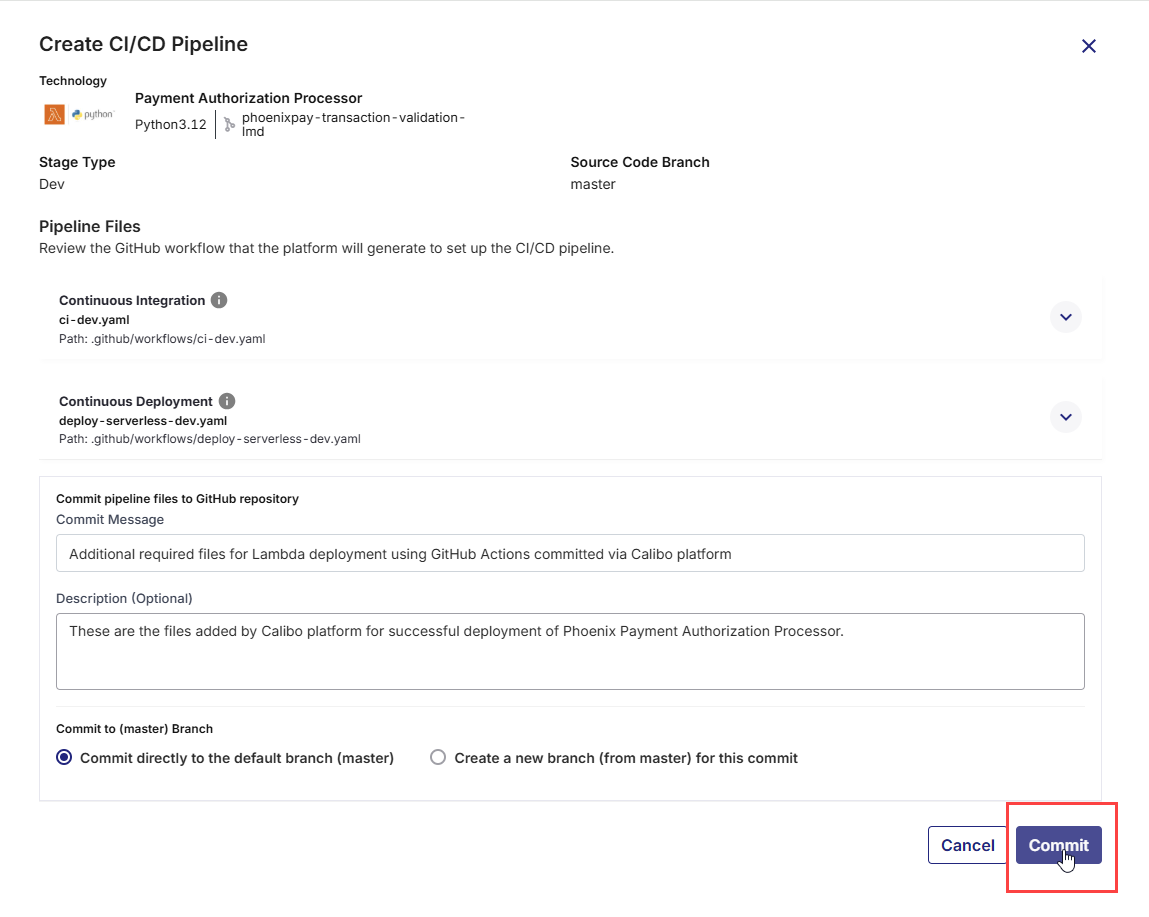
These files will then be available in your repository’s
.github/workflows/folder, and GitHub Actions will start using them according to the triggers defined in the YAML files. -
4. Run the CI Pipeline
-
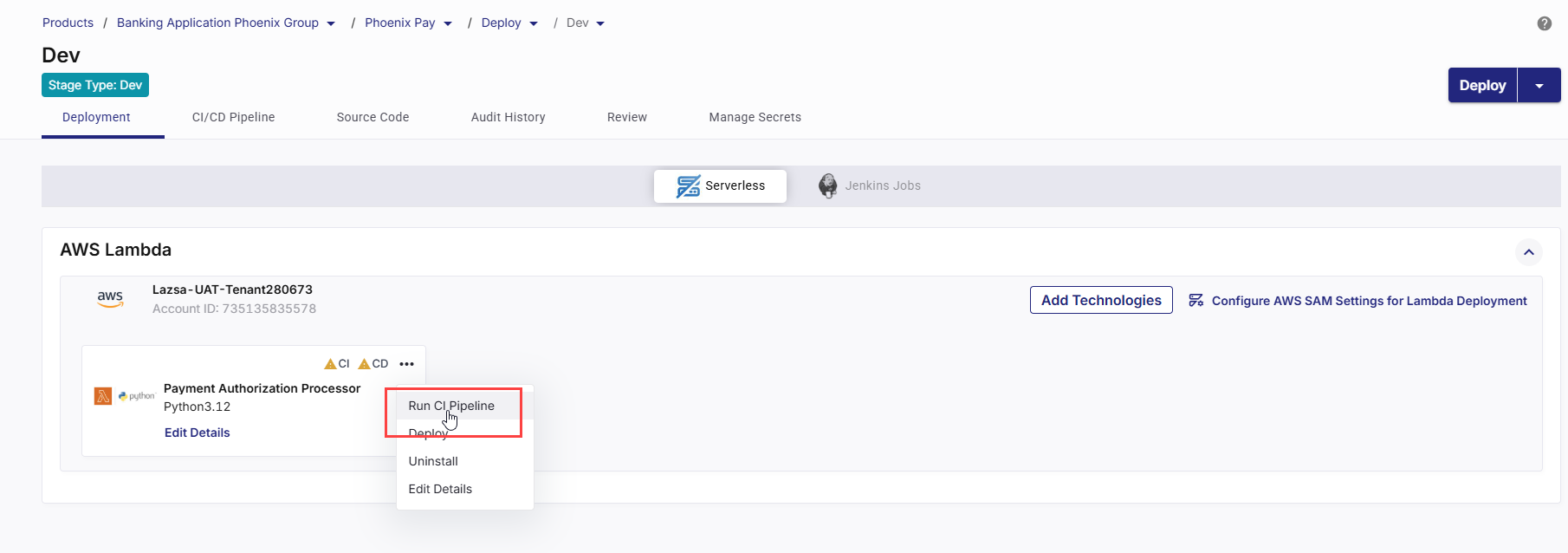
On the technology card, click the ellipsis (...).
-
Click Run CI Pipeline.
-
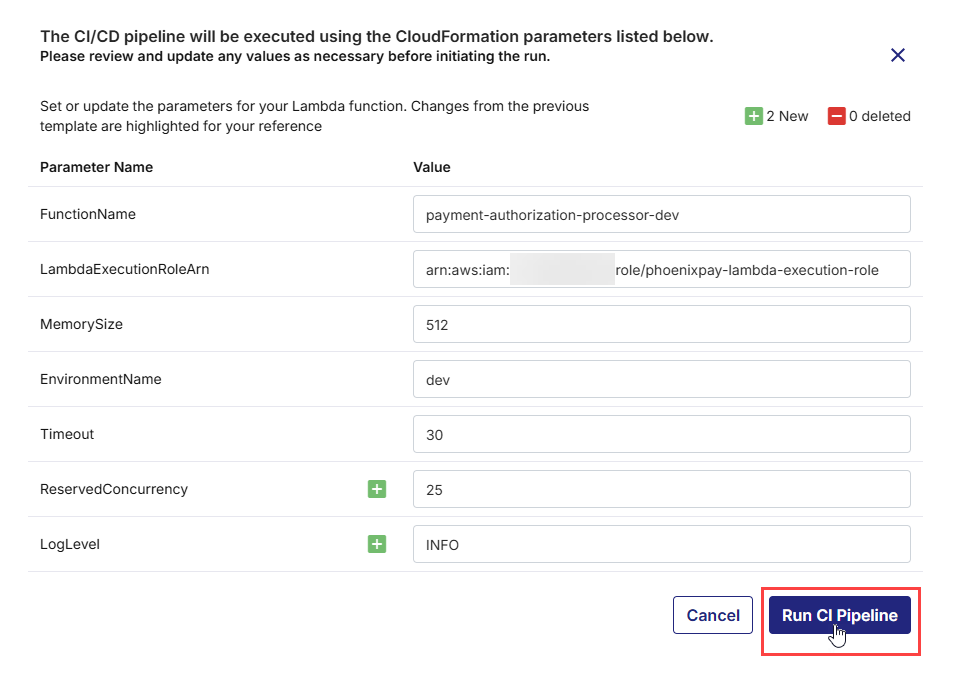
In the CloudFormation Parameters for Lambda Deployment side drawer, review the CloudFormation parameter values that will be passed to the AWS SAM build/package workflow (these values are sourced from your Parameters Configuration step).
-
If required, override parameter values directly in the dialog. These overrides apply to this CI execution.
-
Click Run CI Pipeline to trigger the GitHub Actions CI workflow for this technology. The workflow builds and packages the Lambda application using the selected template and the reviewed parameter overrides.
-
After the CI pipeline starts, the CI status changes to CI pipeline in progress.
-
Click Refresh in the top right to update the status.
-
After the pipeline completes, the CI status changes to CI pipeline success.
-
To check real-time progress of your CI pipeline,
Go to the CI/CD Pipeline tab.
In the Continuous Integration (CI) pipeline for the Lambda technology being deployed, review each step:
-
Set Up Job – Starts the GitHub Actions job on the runner and prepares the execution context (job workspace, environment variables, permissions, and required runner setup).
-
Pull Snyk / Snyk Docker – Pulls the Snyk scanner image when Snyk is enabled for the stage and the Lambda package type is set to Image. This step performs vulnerability scanning on the container image as part of the CI workflow.
This step is not applicable for ZIP-based Lambda deployments.
-
Checkout Code – Checks out the Lambda source code and AWS SAM template from the configured Git branch in the source code repository.
-
Initialization – Performs initial setup tasks such as preparing directories, validating configuration files, and setting up environment variables required for subsequent steps.
-
Unit Tests – Executes automated unit tests defined for the Lambda application to validate function logic before packaging. The CI run fails if tests fail.
-
SonarQube Scan – Runs static code analysis using SonarQube when it is enabled for the stage. Code quality results are captured and enforced as per configured quality gates.
-
Configure AWS Credentials - Configures AWS authentication for the pipeline run using the selected cloud account and execution role. This enables the pipeline to interact with AWS services securely.
-
Set Up SAM- Installs and configures the AWS SAM CLI in the runner environment, preparing the pipeline for SAM-based build and packaging operations.
-
SAM Build -Builds the Lambda application using AWS SAM. This step compiles dependencies and prepares the application artifacts based on the selected packaging type (ZIP or Image).
-
SAM Package - Packages the built artifacts:
-
For zip-based deployments, artifacts are uploaded to the configured S3 bucket.
-
For image-based deployments, container images are prepared for publishing to Amazon ECR.
-
-
Build Container Image – Creates a Docker image of the application from the repository (typically using the Dockerfile and build context) and tags the image for downstream scanning and publishing.
-
Create Change Set- Generates a CloudFormation change set based on the SAM template and the parameter values provided for the CI run. This allows review of proposed changes before deployment.
-
Snyk Installation – Installs the Snyk CLI in the pipeline.
-
Snyk Monitor – Publishes the project snapshot to Snyk so vulnerabilities can be tracked over time in the Snyk dashboard (baseline tracking and ongoing monitoring).
-
Container Image Scan – Scans the built container image for vulnerabilities based on the configured severity gate. The CI pipeline fails when detected vulnerabilities exceed the selected threshold.
-
Publish Container Image – Pushes the built (and approved) container image to the configured container registry, so it can be pulled during deployment.
-
Push to Collector – Sends CI execution metadata, stage results, and relevant logs to Calibo Accelerate for traceability, audit history, and pipeline visualization.
-
Post Configure AWS Credentials - Cleans up or resets AWS credentials and execution context after deployment-related operations are completed.
-
Post Checkout Code - Performs workspace cleanup after CI execution (removes checked-out files, temp artifacts, cached data created during the run).
-
Complete Job- Finalizes the CI workflow run and marks the execution status (Success/Failure) in the CI/CD Pipelines view in Calibo Accelerate.
-
5. Deploy the Technology
After the CI pipeline completes successfully, you can deploy the Lambda application.
-
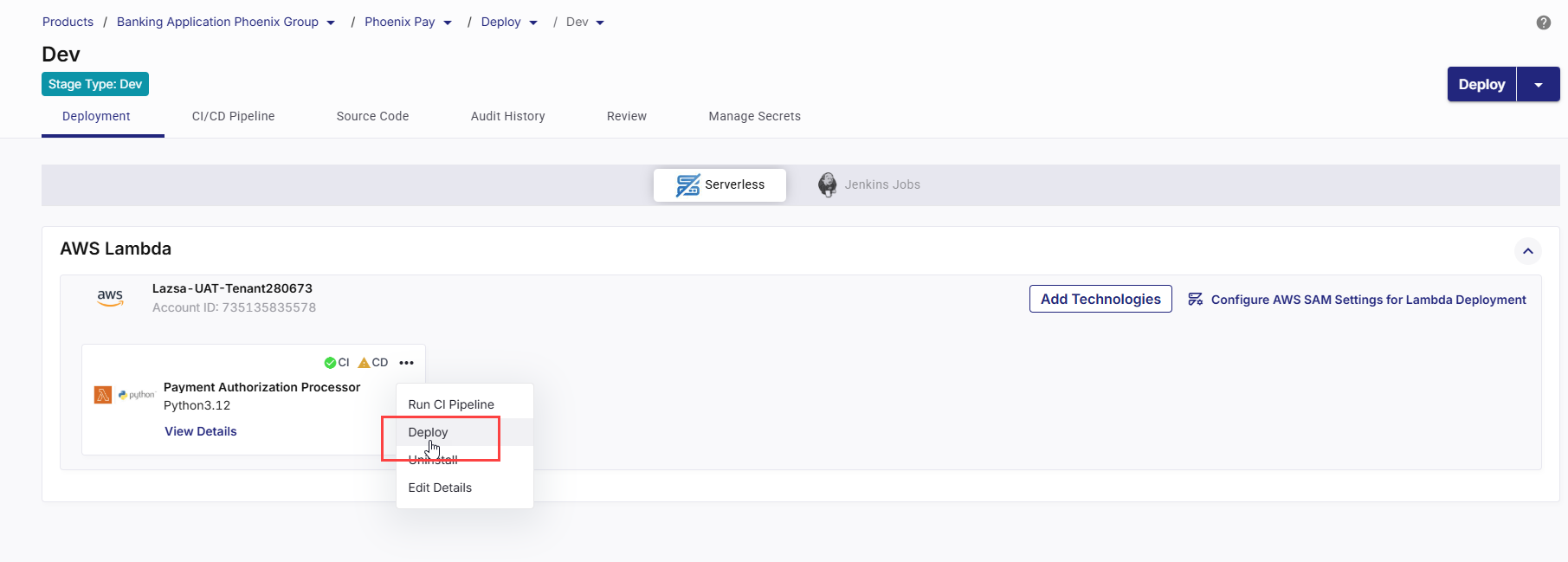
On the Lambda technology card, click the ellipsis (...).
-
Click Deploy.
-
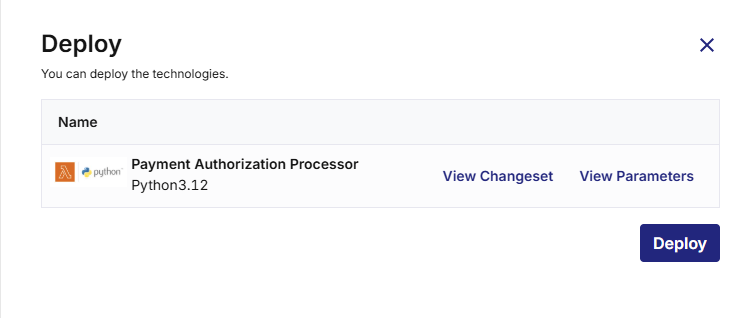
The Deploy side drawer lists the Lambda technology selected for deployment.
-
Review the Changeset
Click View Changeset to see the CloudFormation changes that will be applied.
The changeset shows which AWS resources will be added, updated, or replaced (such as the Lambda function, IAM roles, or API Gateway resources).
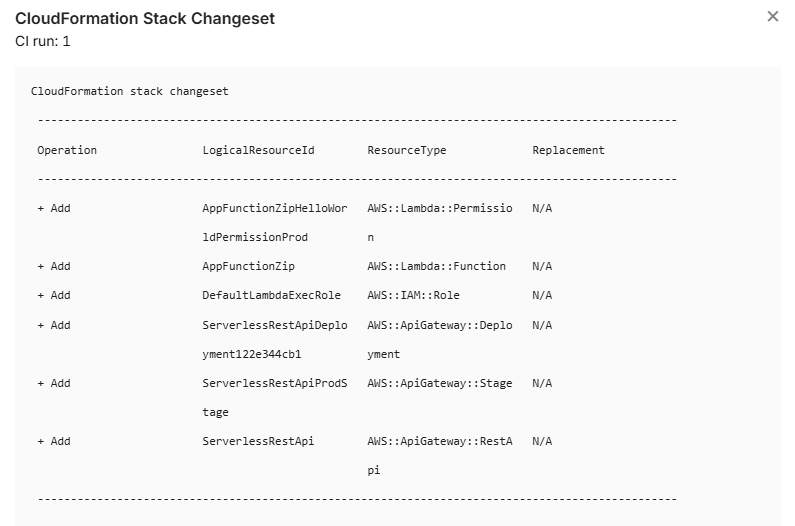
Review this carefully to understand the deployment impact and ensure no unintended infrastructure changes will occur.
-
Review the Parameters
Click View Parameters to view the exact CloudFormation parameter values that will be used.
These values come from the Parameters Configuration step and any overrides provided during the CI run.
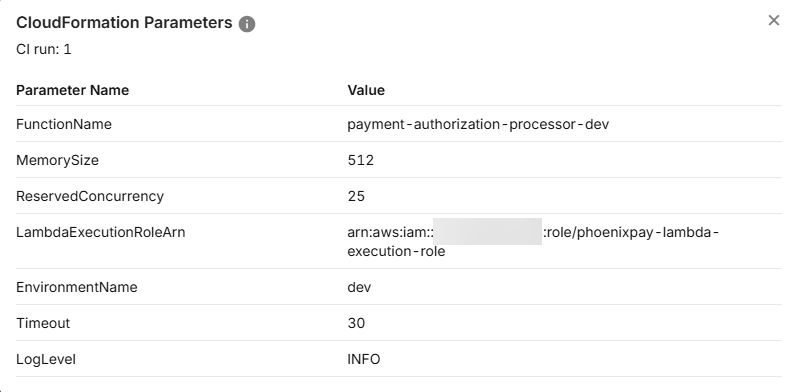
Verify environment-specific settings such as function name, memory, timeout, concurrency, execution role, log level, and so on.
-
If you need to add, remove, or modify CloudFormation parameters (for example, introduce a new parameter or change its definition), update the template.yaml file in the source code repository and commit the changes.
After committing the update, return to Calibo Accelerate and run the CI pipeline again. The updated parameters will be reloaded and available for review and override in the Parameters Configuration step.
If you only need to change parameter values (not their definitions), you can update the values directly in Calibo during the CI run or before deployment—no template change is required.
-
Click Deploy. CD status changes to Pipeline build is in progress.
-
- Click Refresh in the top right to update the status. When the deployment is complete, CD status changes to Deployed.
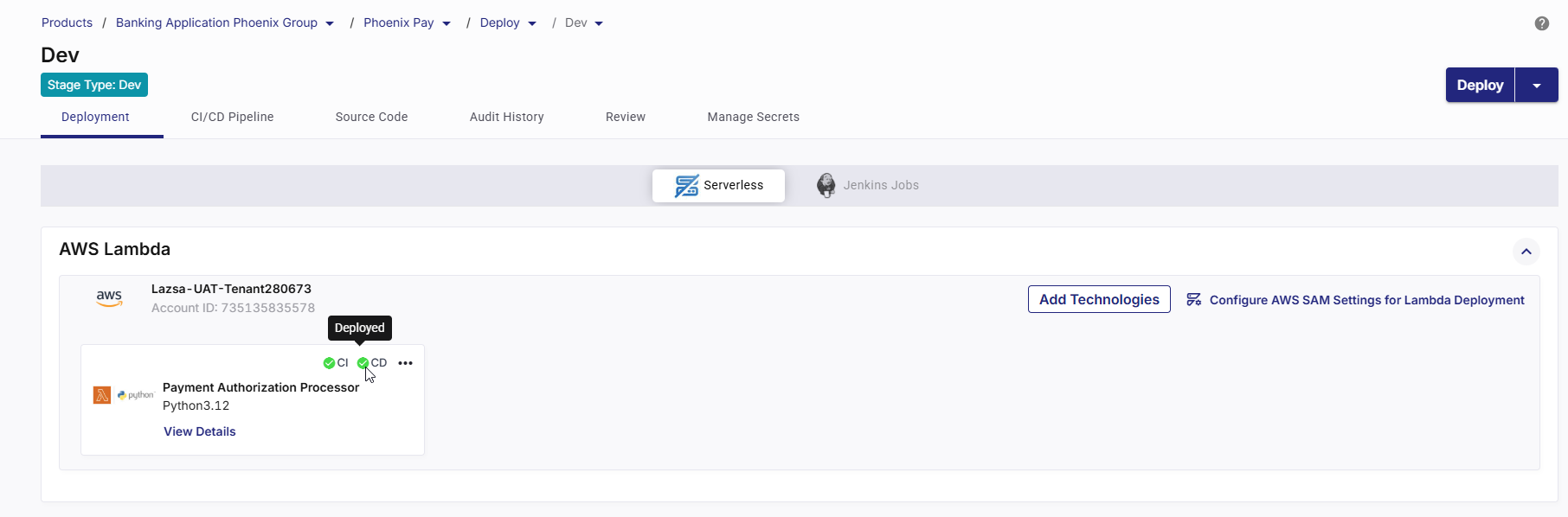
6. View Deployment Details and Validate a Deployed Lambda Function
After a Lambda technology is successfully deployed, you can review deployment configuration, monitor execution, test the function, and analyze logs and metrics directly from Calibo Accelerate.
Click View Details on the Lambda technology card to check the following:
Basic DetailsOn the Basic Details tab, review the following details used for this Lambda function:
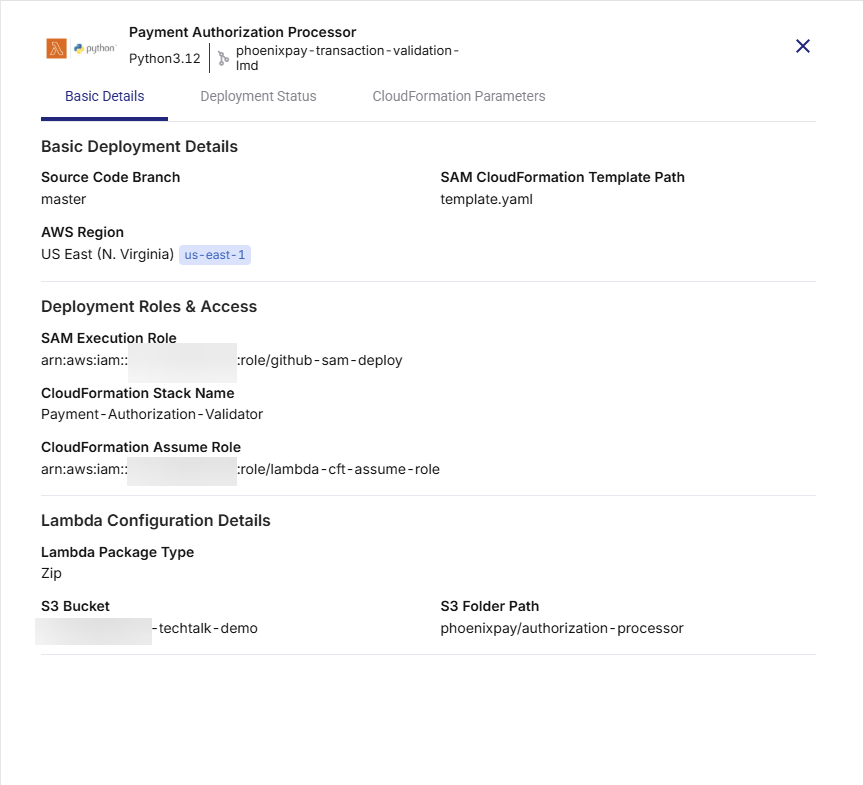
-
Source Code Branch – Git branch used during CI execution.
-
AWS Region – Region where the Lambda function is deployed.
-
SAM CloudFormation Template Path – Template file used for deployment.
-
SAM Execution Role – IAM role used by SAM during deployment.
-
CloudFormation Stack Name – Stack managing the Lambda resources.
-
CloudFormation Assume Role – Role assumed by CloudFormation, if configured.
-
Lambda Package Type – Zip or Image.
-
S3 Bucket and Folder Path – Artifact location for Zip-based deployments.
This confirms exactly what configuration was deployed.
Deployment StatusThe Deployment Status tab provides end-to-end visibility into pipeline execution, runtime validation, logs, and operational metrics for the deployed Lambda function.
1. CI and CD Pipeline Links
-
CI URL – Opens the GitHub Actions workflow used for build and validation.
Use this link to review build steps, test execution, security scans, and artifact preparation. -
CD URL – Opens the GitHub Actions workflow used for deployment.
Use this link to track CloudFormation stack creation or updates and deployment execution status.
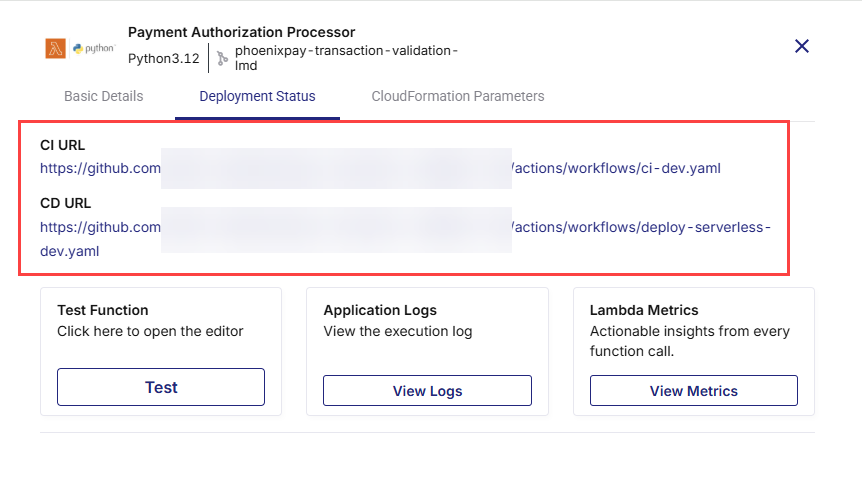
These links enable direct traceability between Calibo and the underlying GitHub Actions workflows.
2. Test the Lambda Function
-
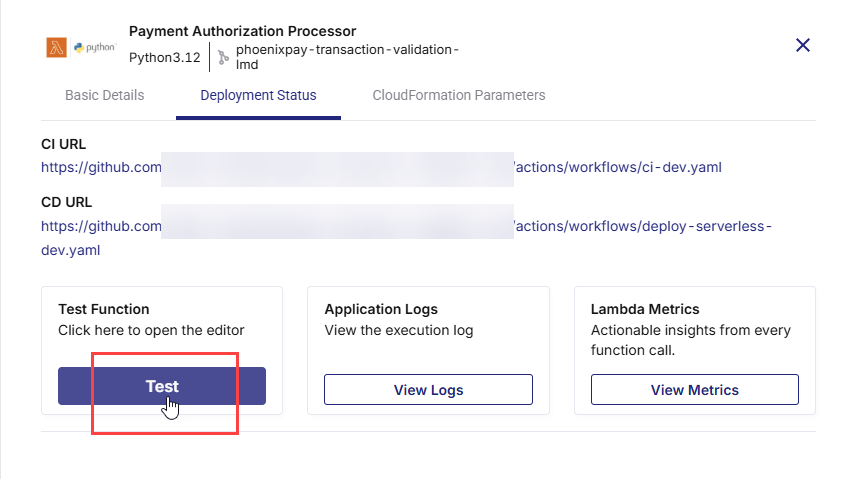
Click Test under Test Function.
-
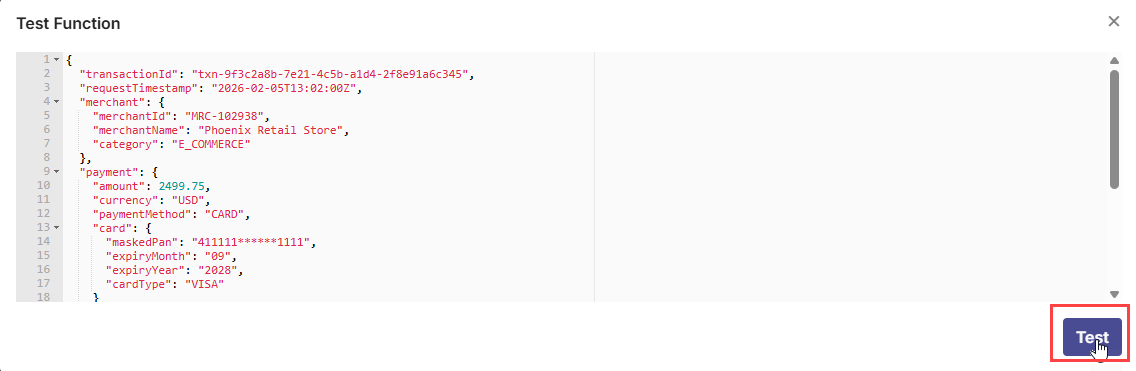
An editor opens where you can provide a JSON event payload.
-
Click Test to invoke the deployed Lambda function.
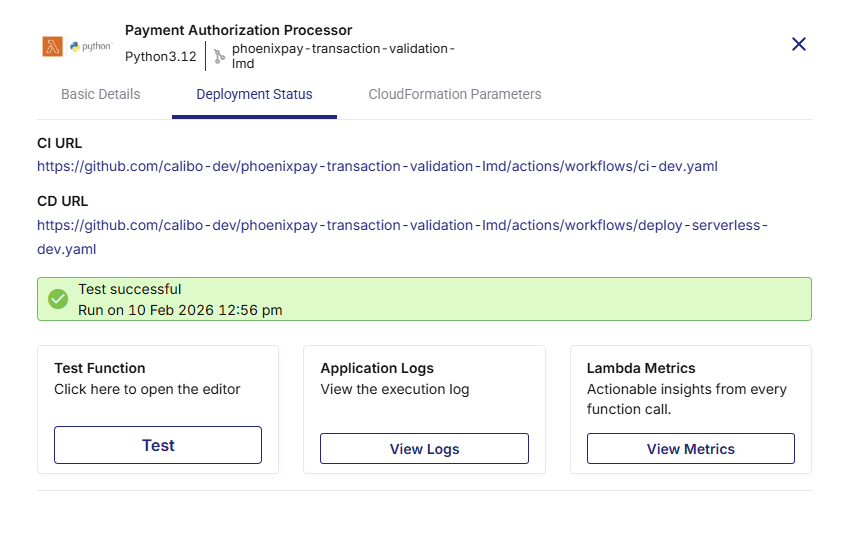
This allows you to validate function behavior immediately after deployment without leaving the platform.
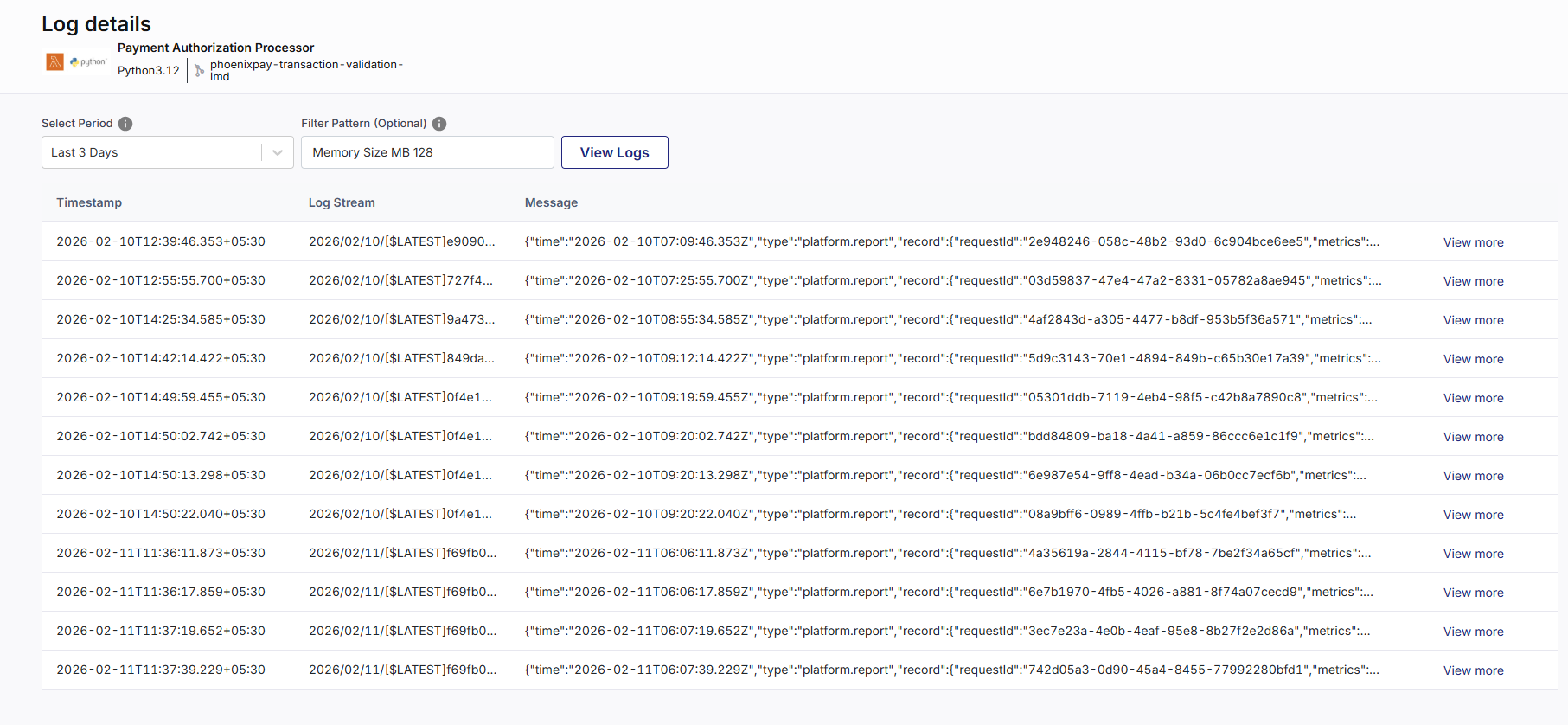
3. View Application Logs
-
Click View Logs under Application Logs.
The Log Details screen opens.
-
Select the required time period and optionally specify a filter pattern.
-
Click View Logs to retrieve execution logs from CloudWatch.
Use this view to troubleshoot runtime issues and inspect function execution details.
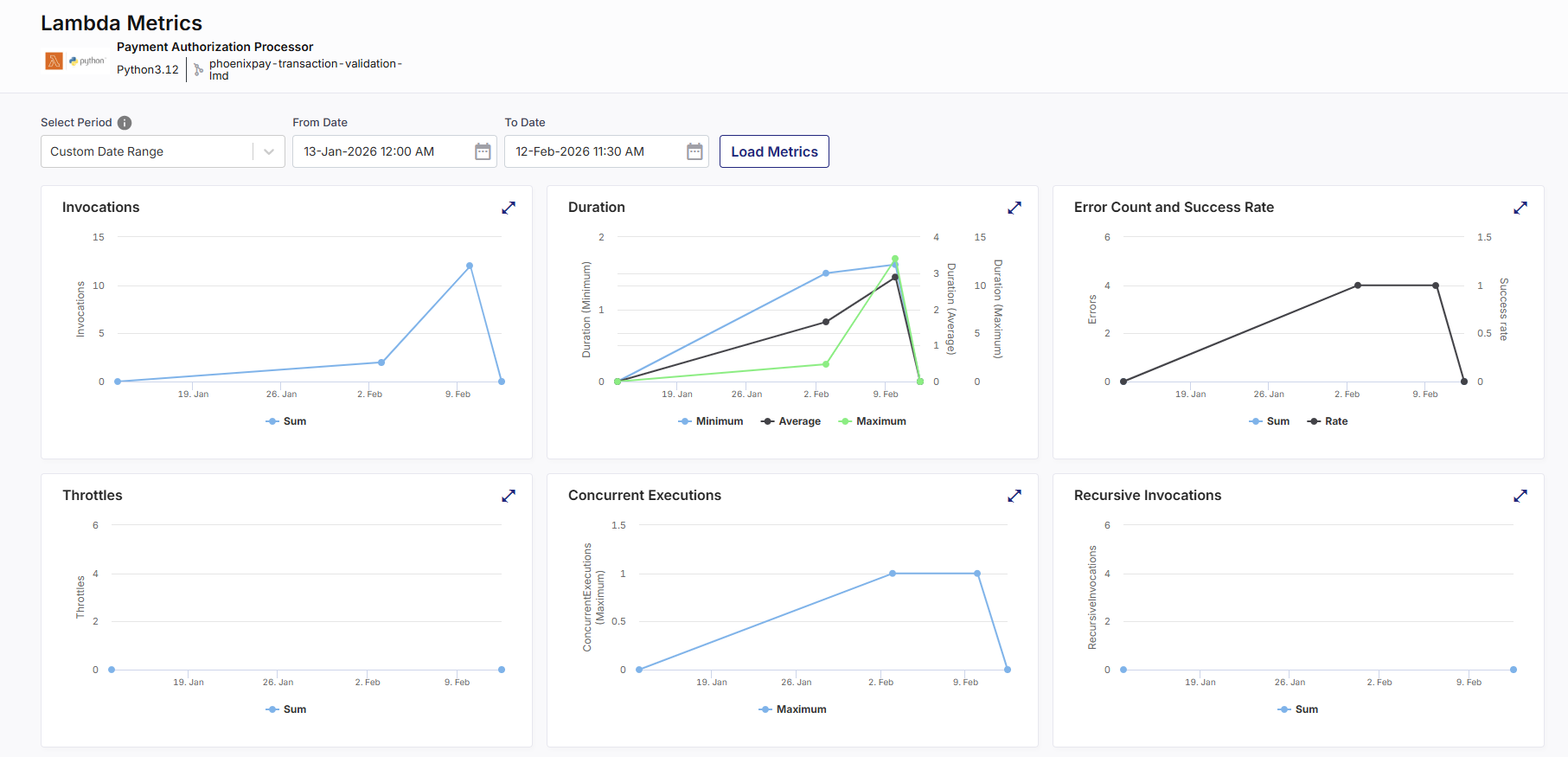
4. Analyze Lambda Metrics
-
Click View Metrics under Lambda Metrics.
-
Select a time range and click Load Metrics.
-
Review operational metrics such as:
-
Invocations
Total number of times the Lambda function was executed during the selected time period. -
Duration
Time taken by the function to process a request.-
Minimum shows the fastest execution.
-
Average shows typical performance.
-
Maximum highlights peak processing time.
-
-
Error Count and Success Rate
-
Error Count represents the number of failed executions due to unhandled exceptions or runtime errors.
-
Success Rate indicates the percentage of successful executions relative to total invocations.
-
-
Throttles
Number of invocation requests rejected because the function exceeded its configured concurrency limit. -
Concurrent Executions
Number of function instances running simultaneously. This reflects real-time load and scaling behavior. -
Recursive Invocations
Number of times the Lambda function directly or indirectly triggers itself. This can be an intentional design pattern or, more often, an unintentional error leading to an infinite loop, increased costs, and system instability. -
Async Event Age
The time (in milliseconds) that an asynchronous event has been waiting in the queue before being processed. Higher values may indicate processing delays or backlogs. -
Async Events Received
Total number of asynchronous events received by the Lambda function during the selected time period. -
Iterator Age
For stream-based event sources (such as Kinesis or DynamoDB Streams), this represents the age of the last record processed. Increasing iterator age may indicate that the function is falling behind in processing stream records. -
Success / Failure / Throttle Rate
-
Success Rate – Percentage of successful invocations.
-
Failure Rate – Percentage of executions that resulted in errors.
-
Throttle Rate – Percentage of invocation attempts rejected due to concurrency limits.
-
-
These metrics help assess performance, reliability, and scaling behavior of the Lambda function.
CloudFormation ParametersOpen the CloudFormation Parameters tab.
Review the list of parameters and values passed during the CI pipeline run.
This includes:
-
Parameters defined in template.yaml
-
Values provided or overridden during
-
The exact inputs used to create or update the CloudFormation stack
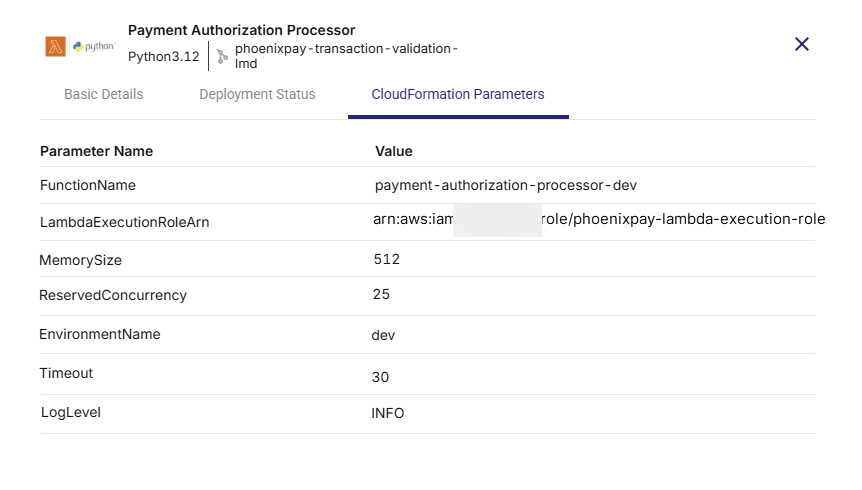
This view is critical for auditability and repeatable deployments.
Step 7: Monitor the Continuous Deployment (CD) Pipeline for Lambda (AWS SAM)
You can track the real-time status of your Lambda deployment from the CI/CD Pipelines tab.

You can review the following stages of the CD pipeline:
-
Set Up Job
Initializes the GitHub Actions runner environment and prepares the execution context for deployment. -
Checkout Code
Pulls the latest source code and SAM template from the configured GitHub repository. -
Initialization
Sets required environment variables and prepares runtime configuration for SAM execution. -
Configure AWS Credentials
Authenticates to AWS using the configured OIDC role or IAM credentials. Ensures the workflow has required permissions to create or update CloudFormation stacks. -
Set Up SAM
Installs and configures the AWS SAM CLI on the runner environment. -
SAM Deploy
Executes the SAM deployment command. This step:-
Builds the application (if required)
-
Packages artifacts (ZIP or image)
-
Creates or updates the CloudFormation stack
-
Applies infrastructure changes
-
-
Push to Collector
Sends deployment metadata and status information back to Calibo Accelerate for tracking and audit purposes. -
Post Checkout Code
Performs post-deployment cleanup of the runner workspace. -
Complete Job
Marks the deployment workflow as complete and updates the status in Calibo Accelerate.
To investigate any particular pipeline stage, click that stage in the pipeline timeline. You are redirected to the corresponding GitHub Actions workflow run. You can review the console logs, SAM build output, CloudFormation changeset details, and any error messages directly in GitHub Actions.
Uninstall a Lambda Technology
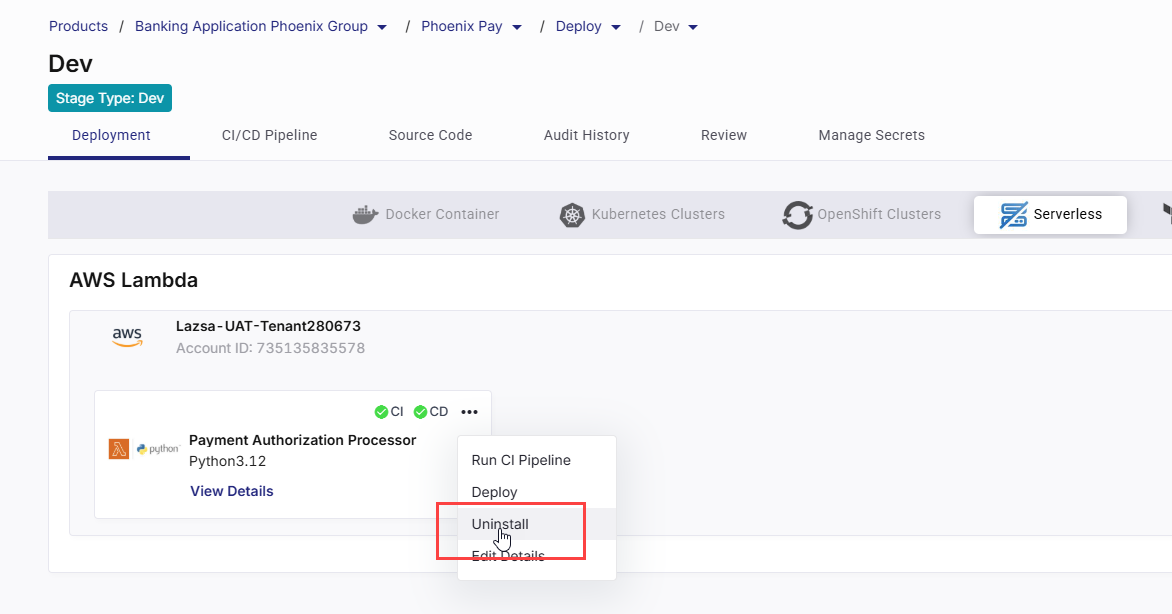
To remove a Lambda deployment:
-
Click the ellipsis (…) on the technology card.
-
Select Uninstall.
-
Confirm the action.
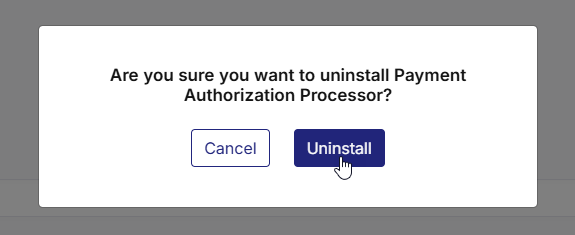
This removes:
-
Lambda deployment configuration
-
Associated CI/CD pipelines
-
CloudFormation stack (as applicable)