Manage Minimum Viable Data (MVD)
Calibo Accelerate provides several management options that allow authorized users to manage existing Minimum Viable Data (MVD) definitions. Depending on your assigned role and the current state of the MVD, you can:
-
Clone an existing MVD
-
Edit MVD details
-
Transfer MVD Ownership
To access these options, follow these steps:
-
Navigate to the Minimum Viable Data screen by using either of the following methods:
-
From the required Product, click the ellipsis (…) and then click Minimum Viable Data.
-
From the left navigation pane, select Data Lab > Minimum Viable Data.
-
-
On the Minimum Viable Data screen, locate the required MVD.
-
Click the ellipsis (…) corresponding to the MVD.
-
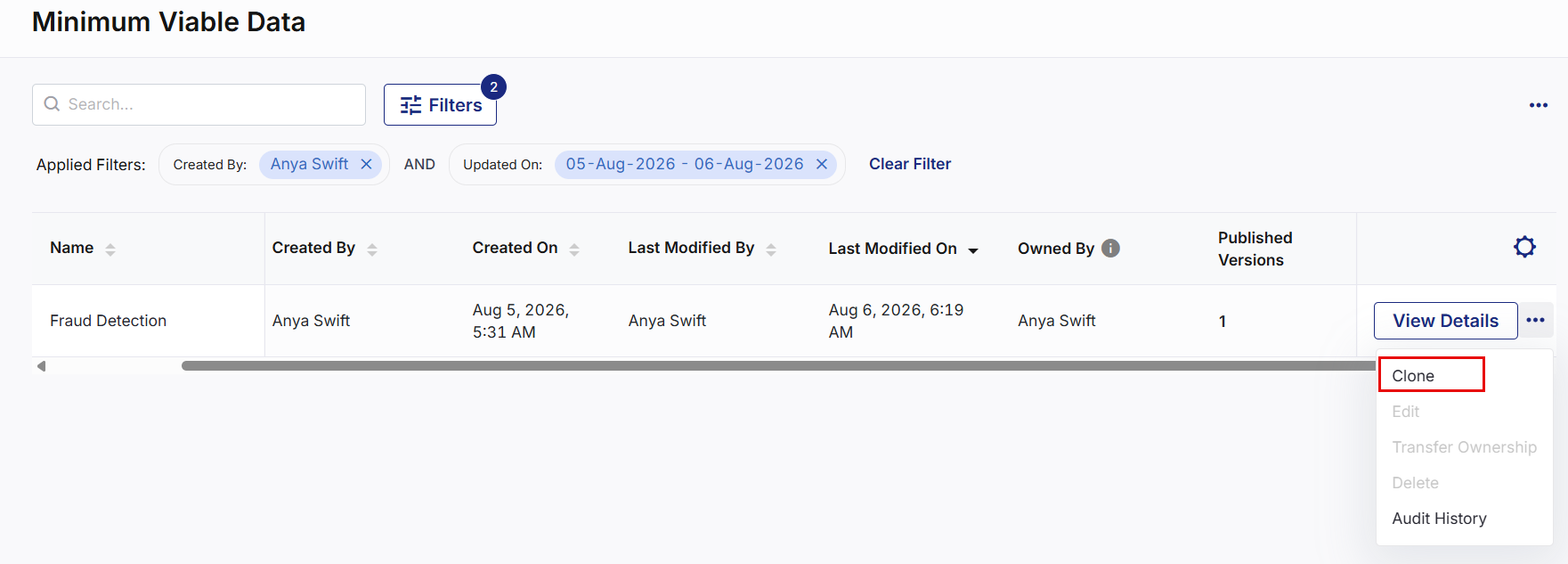
The following management options are available:
-
Clone
-
Edit
-
Transfer Ownership
-
Delete
-
Audit History
-
 Clone an MVD
The Clone option allows Data Scientist to create a new MVD by copying the details and specifications of an existing MVD. Cloning is useful when creating a similar MVD without redefining the specification from scratch.
-
From the ellipsis (…) corresponding to the required MVD, click Clone.
-
On the Clone MVD screen, review and update the MVD details such as name, purpose, description , and product.
-
Click Next.
-
On the Specifications tab, select the specification version to clone from the Version list.
-
Review or modify the copied specification, including:
-
Version Title
-
Column configuration
-
Data types
-
Anonymization rules
-
Data quality rules
-
Filters
-
Row count
-
-
Click Create MVD.
-
A new MVD is created with the selected specification version and is added to the Minimum Viable Data screen in the Draft state.
Note:
Cloning creates independent MVD. Changes made to the cloned MVD do not affect the original MVD.
Edit MVD Details
The Edit option allows you to modify the general information of an existing MVD.
-
From the ellipsis (…) corresponding to the required MVD, click Edit.
-
On the Edit MVD Details screen, update the Purpose and Description information.
-
Click Update MVD.
-
The MVD details are updated successfully. Existing specification versions remain unchanged.
Transfer MVD Ownership
The Transfer Ownership option allows a Product Owner to transfer ownership of an MVD to another Data Scientist within the same product.
-
From the ellipsis (…) corresponding to the required MVD, click Transfer Ownership.
-
In the Transfer Ownership side screen, select the new owner from the Owner list.
-
Click Save.
-
Ownership of the MVD is transferred to the selected Data Scientist.
-
A system notification is displayed to both the previous owner and the new owner indicating that the ownership has been transferred.
-
An email notification is sent to the new owner confirming the ownership transfer. The email includes the MVD name, the associated product, the previous owner, and the new owner.
Note:
-
Only users with the Product Owner role can transfer MVD ownership.
-
The new owner must have the Data Scientist role within the same product.
-
Ownership transfer does not affect existing validation history, published versions, or associated Data Assets.
Delete an MVD
The Delete option permanently removes an MVD from the selected product.
Note:
-
You cannot delete an MVD if it has one or more published versions. In this case, the Delete option is disabled.
-
Deleting an MVD is a permanent action and cannot be undone.
-
From the ellipsis (…) corresponding to the required MVD, click Delete.
-
In the confirmation dialog box, click Delete to confirm the deletion.
-
The deleted MVD is permanently removed from the product.
-
A confirmation notification is displayed indicating that the MVD has been deleted.
-
An email notification is sent to the MVD Owner confirming that the MVD has been deleted.
|
What's next? Minimum Viable Data (MVD) Audit Logs |