Compare MVD Versions
Use the Compare feature to compare two specification versions of an MVD side by side. This helps you identify differences in column definitions and configuration settings, including items that were added, modified, or are not available in one of the selected versions.
Use the comparison to understand what changed between versions before reviewing, approving, certifying, or consuming an updated MVD.

Note:
The comparison view is read-only and does not modify either MVD version.
Compare Two MVD Versions
To compare MVD versions, follow these steps:
-
On the Minimal Viable Data screen, locate the required MVD.
-
Click View Details corresponding to the MVD.
-
On the MVD Details screen, click Compare.
-
On the Compare MVD Versions screen, in the Base Version field, select the version that you want to use as the reference for the comparison.
-
In the Comparison Version field, select the version that you want to compare with the base version.
Note:
The comparison version must be higher than the selected base version. If the latest version is selected as the Base Version, the Comparison Version list displays No higher version available for comparison.
-
Click Compare.
Review the Comparison
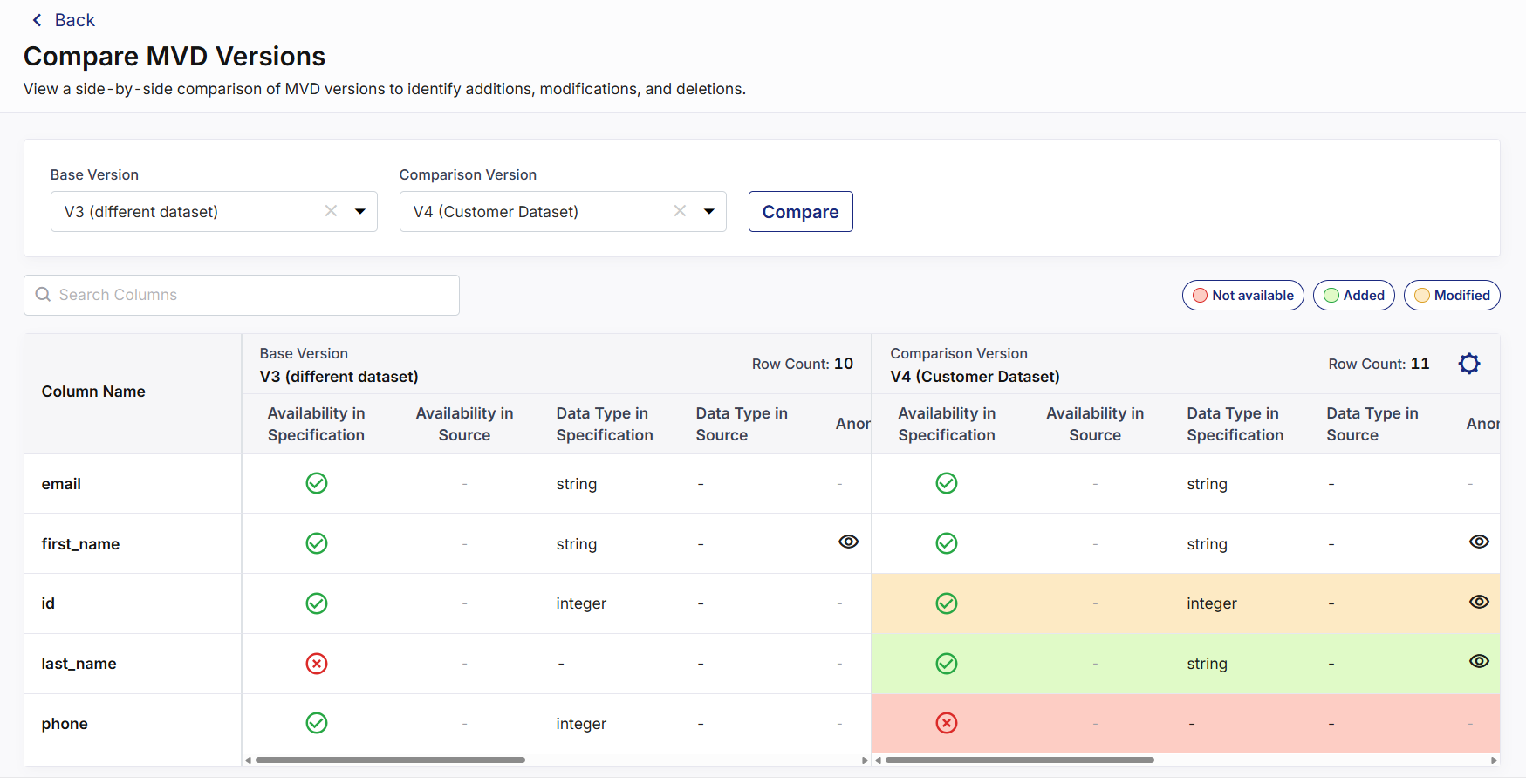
The comparison table displays each column and its configuration in the Base Version and Comparison Version. Depending on the available configuration, you can compare details such as:
| Comparison Attribute | Description |
|---|---|
| Availability in Specification | Indicates whether the column is defined in the MVD specification. |
| Availability in Source | Indicates whether the column is available in the source dataset. |
| Data Type in Specification | Displays the data type defined for the column in the MVD specification. |
| Data Type in Source | Displays the corresponding data type identified in the source dataset. |
| Anonymization Rules | Indicates whether anonymization rules are configured and enables you to view the associated rule details. |
| Data Quality Rules | Displays the configured data quality requirements for the column. |
| Data Distribution Rules | Displays the configured data distribution rules, when applicable. |
| Filters | Displays the filtering criteria configured for the column. |
-
Use the Search Columns field to locate a specific column in the comparison results.
-
Changes between the selected versions are highlighted to make differences easier to identify:
-
Not available – Indicates that a column or configuration available in the base version is not available in the comparison version.
-
Added – Indicates that a column or configuration has been added in the comparison version.
-
Modified – Indicates that an existing column or its configuration has changed between the two versions.
-
-
When you click an indicator, the corresponding columns are hidden from the comparison table. Click the indicator again to display those columns.
-
Click the (
 ) icon to view the associated rule details and identify the configuration changes.
Customize the Comparison Table
You can customize the information displayed in the comparison table:
-
Click the (
 ) icon in the comparison table.
-
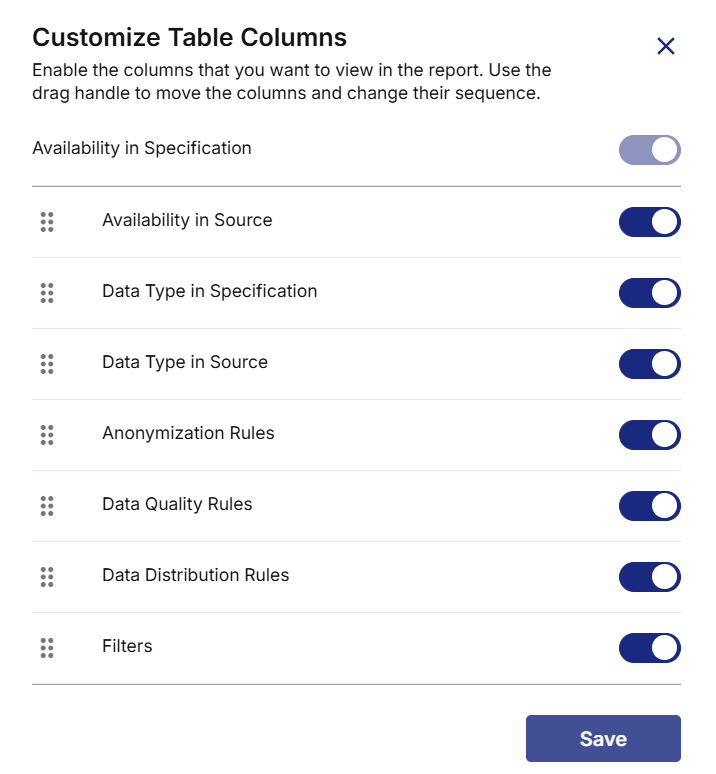
In the Customize Table Columns side panel, enable or disable the attributes that you want to display.
-
Use the (
 ) drag handle to rearrange the enabled attributes and change their display sequence.
-
Click Save.
-
The comparison table is updated based on your selections.
|
What's next? Manage Minimum Viable Data (MVD) |
 Recommended Topics