Transferring Ownership of Data Assets
Ownership identifies the primary user responsible for maintaining a Data Asset throughout its lifecycle. Ownership transfer helps maintain accountability when responsibilities move between team members.
The owner is responsible for:
-
Maintaining asset metadata
-
Managing configuration updates
-
Updating usage guidance
-
Managing publication activities
-
Ensuring overall asset quality
When to Transfer Ownership
Ownership transfer is required when:
-
A project changes ownership
-
Team responsibilities change
-
An asset is handed over to another Data Engineer
-
An owner leaves the project or organization
-
A different user becomes responsible for maintaining the asset.
To Transfer Ownership
-
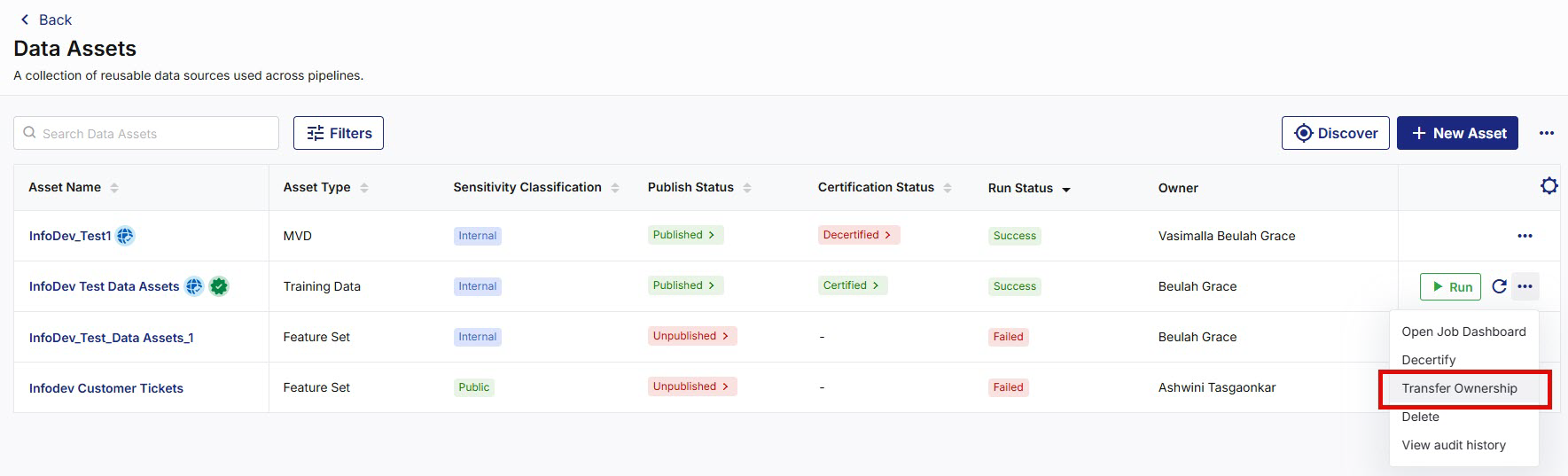
Navigate to Data Assets and search for the required data asset.
-
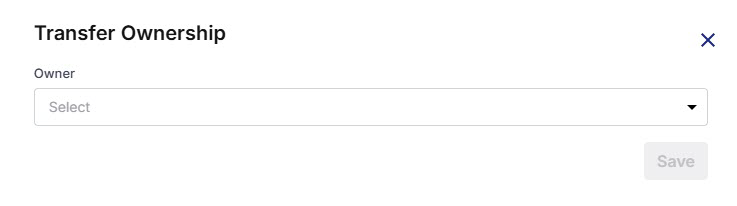
From the ellipsis (…) next to the data asset, select Transfer Ownership. A Transfer Ownership popup opens.
-
Select the new owner from the Owner dropdown, then click Save.
-
After the ownership transfer is completed:
-
The selected user becomes the new asset owner.
-
Ownership information is updated within the asset metadata.
-
Future maintenance responsibilities are assigned to the new owner.
-
The ownership change is recorded in the audit trail.
-
|
What's next? Exploring Data Asset Details |
 Recommended Topics