Editing Data Assets
The editing feature allows you to update and maintain data asset information throughout the asset lifecycle. Regular updates help improve data discoverability, usability, and governance.
As business requirements, data sources, and governance requirements change, you can modify asset metadata, configuration details, usage guidance, and other asset-related information to keep the asset accurate and relevant.
Keeping asset information updated helps you make informed decisions when consuming the data. You can edit a data asset to:
-
Update the asset description
-
Modify the business purpose
-
Change tags or classifications
-
Update source information
-
Document new usage guidance
-
Update limitations or processing details
-
Correct metadata inaccuracies
-
Reflect changes in business requirements

Note:
You need to first unpublish the published data asset before editing it.
To edit a data asset
-
Navigate to Data Assets and search for the required data asset.
-
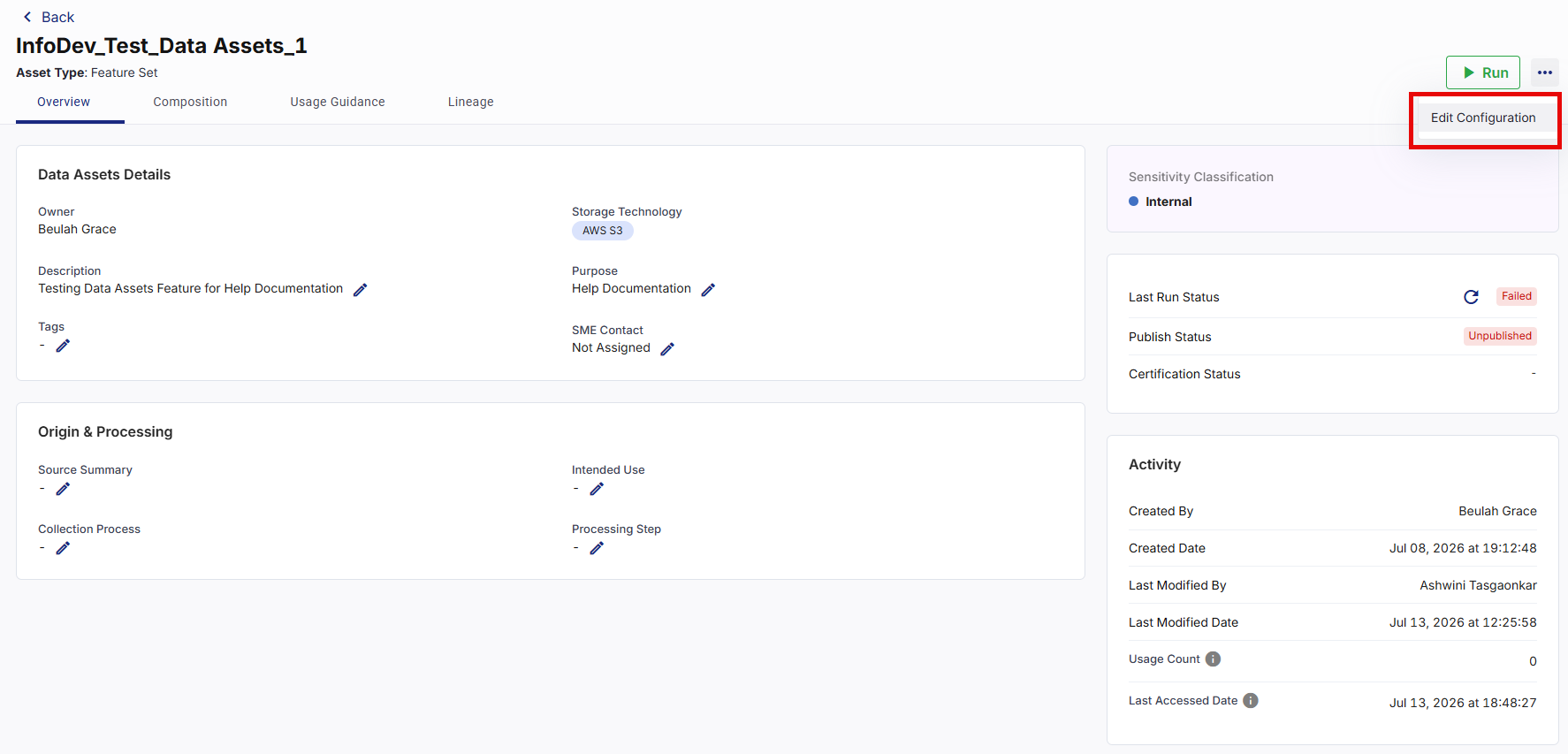
Click Asset Name you want to modify the details. The selected data asset details screen appears.
-
Click the Edit icon next to the field you want to modify.
Or
From the ellipsis (…) on the top right corner, click Edit Configuration to modify the data asset configuration details. For more information, refer to Configuring a Data Asset.
-
Modify the required information and save the changes. The asset information is updated, and the modification details are recorded in the audit history.
Note:
Review the asset status and available actions before making changes to a published asset. As published assets are subject to governance restrictions, you need to unpublish an asset before modifying any information.
|
What's next?Deleting Data Assets |
 Recommended Topics